



Online communities and coaching sites must now have real-time interaction. A WordPress group chat application can turn your website into a more engaging website where visitors can participate in private messaging, video calls, and topic-based rooms, even while normal comments and emails are slow.
After testing many plugins, we’ve grouped the top picks into two categories. First, all-in-one platforms like ZenCommunity that pair chat with forums and directories. Second, plugins designed only for messaging. If you’re exploring community-focused solutions, our guide to the best WordPress community plugins in 2026 offers a broader comparison.
What Is a WordPress Group Chat Plugin?
From Comments to Real-Time Chat
Consider remarks such as passing notes in class—slow and unorganized. You write a note and wait. Maybe you get a response. Maybe not.
With group chat, conversations happen in real-time. Messages appear instantly, discussions move naturally, and users feel like they’re together in the same room, even when miles apart.
Benefits of Adding Group Chat
- Live-Action: Customers do not wait to be responded to. They enquire and receive responses instantly, and they stay on your site longer.
- Community Building: Chat makes belonging. In a group of people chatting, they manage to invest in your community and come back.
- Greater Time on Site: The longer a user chats, the longer they remain. The longer the time, the higher the page views and loyalty.
- Peer-to-Peer Support (Users Helping Each Other): When users answer each other’s questions, you lighten your support load while building genuine relationships.
- Revenue Opportunities: Special chat rooms and members-only forums generate additional revenue bases.
Features to Look for in a WordPress Group Chat Plugin
- Group Chat Rooms: Topic-based rooms in which two or more users communicate on common interests.
- Private Messaging: One-to-one chats to be used in personal relationships and sensitive issues.
- Video / Voice Calls: Face-to-face connection for coaching, support, or casual conversations.
- Community Features: Forums and member directories work alongside chat to create a complete community experience.
- BuddyPress Integration: A smooth integration with the existing community plugins.
- Moderation Tools: Control who chats and manage inappropriate content.
- Mobile Responsive: Chat is ideal on phones and tablets.
The 5 Best WordPress Group Chat Plugins (2026 Edition)
We have tried dozens of them, leading to this list of well-chosen ones. The first one is an all-in-one community platform that includes an in-built chat, and the remaining four are specialized plugins. To have a better understanding of the comparison between the community platforms, refer to our ZenCommunity vs BuddyPress comparison to see which suits you better.
1. Zencommunity: The All-in-One Community Platform with Inbuilt Group Chat
Beyond Just Chat
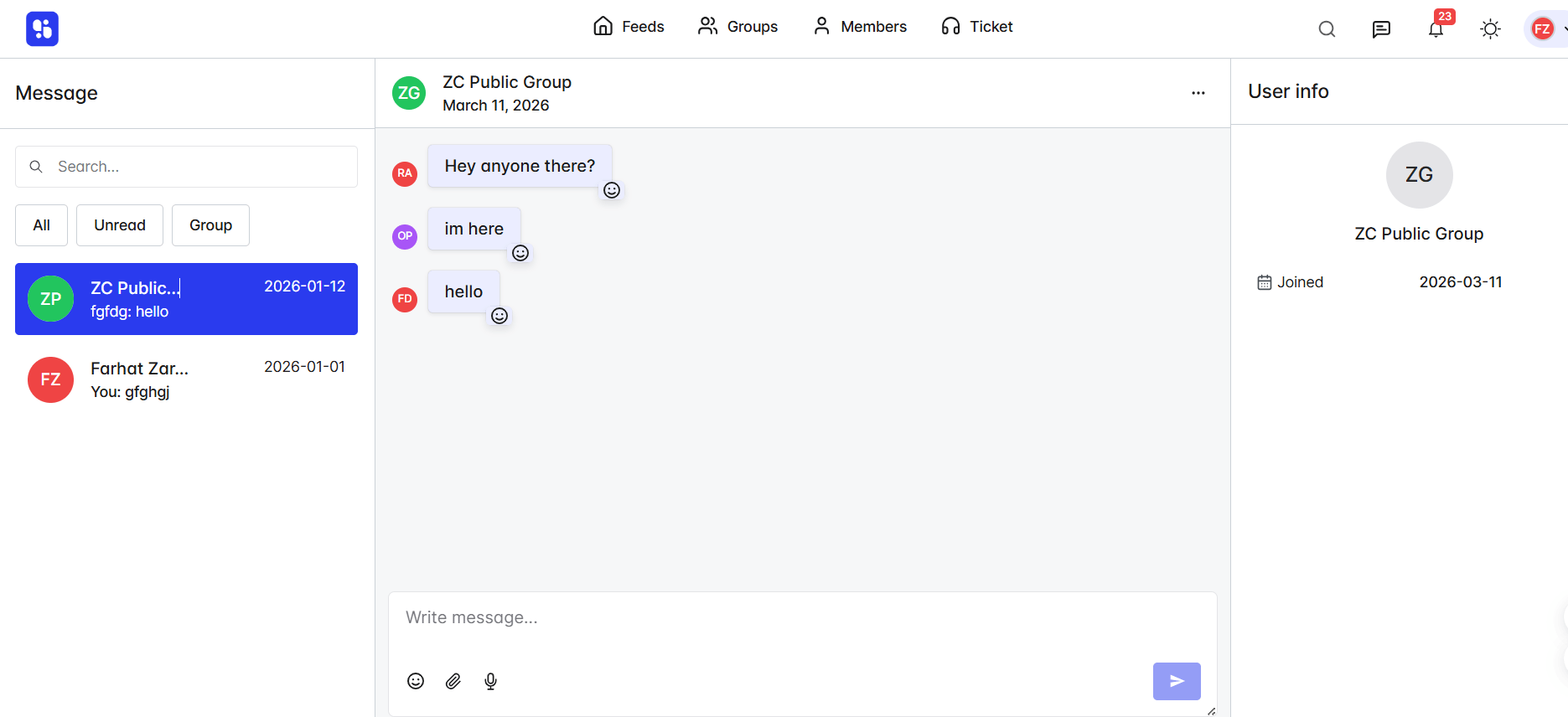
ZenCommunity is not another chat plugin, but a complete community platform. It unites real-time communication with forums, member directories, and activity streams in one place. Running an online school? You might also want to explore how to turn MasterStudy LMS into a community platform with ZenCommunity.
Chat doesn’t exist in isolation. When users join group conversations, they can also participate in forums and connect through member directories. Every interaction connects to everything else.
Why It’s Special
- Combination Experience: Chat connects directly to user profiles and forum discussions. You get a complete view of every member’s participation across your entire community.
- Combined Member Profiles: View a user’s chat history, forum posts, and community contributions all in one place. Learn instantly who your most engaged members are.
- Builds Real Communities: Chat becomes part of something bigger. Users don’t just talk—they build relationships and turn into loyal advocates for your brand.
Key Features
- Group Chat Rooms: Create unlimited chat rooms for different topics or member levels. Control access—public for everyone, private for select groups, or members-only for exclusive spaces.
- Private Messaging: One-on-one line of communication. Excellent when used for coaching or personal relationships.
- Community Forums: Built-in forums where conversation continues even after real-time chat. Always accessible and searchable.
- Member Directories: Assist members in identifying others according to interests/activity. Bring together individuals who should connect.
- Activity Streams: Check out what is going on in your community—new posts, new chats, member accomplishments.
- Mobile Responsive: All features are optimized for mobile and tablets.
Best For
SaaS businesses, online course developers, membership platforms, and any company that desires a loyal group of followers. For course creators, we include a detailed tutorial on how to extend LearnPress beyond courses using ZenCommunity communities.
Pricing
Freemium. Free version includes core features. Premium plans start around $99/year.
2. RumbleTalk Live Group Chat – Most Suitable for HTML5 Group Chat Rooms
Overview
RumbleTalk is an existing player in the WordPress chat market. It’s a powerful HTML5 group chat application that works across all devices—no Flash required.
Key Features
- HTML5 Technology: Works flawlessly on desktop, tablet, and mobile. No downloads needed.
- Moderation Tools: Approve messages before publishing, block users, and assign moderators.
- Customizable Appearance: Customize chat colors to match your brand. Looks like part of your site.
- BuddyPress & bbPress Integration: Users logged into your site are automatically logged into chat.
- Private & Public Rooms: Open chat rooms or private rooms for specific members.
- Message Log: New users can view prior conversations upon joining.
Best For
Sites that require robust, moderated chat rooms within BuddyPress communities.
Pricing
Paid plans start around $34/month.
3. WP Guppy Pro – Ultimate All-in-One Group + Private + Video Chat

Overview
WP Guppy Pro is a full-featured communication plugin that does everything: group chat, private messaging, voice chats, and video calls—all within WordPress.
Key Features
- Group Chat Rooms: Unlimited chat rooms for different topics or membership levels.
- One-to-One Chat: Ideal for coaching or support.
- Video & Voice Calls: Face-to-face conversations without leaving your site. Crystal clear quality.
- WooCommerce Integration: Buyers and sellers chat directly about products. Answer questions and close more sales.
- BuddyPress Compatible: Enhances community features when used with BuddyPress.
- File Sharing: Users exchange images and documents in chat.
- Read Receipts: Track when messages are delivered and read.
- Push Notifications: Notify users even when they are off-site.
Best For
Membership sites, online courses, and e-commerce stores require complete communication features.
Pricing
Premium plans start around $79/one-time.
4. Minnit Chat – Simplest and Fastest Group Chat Setup
Overview
Minnit Chat is a cloud-hosted chatroom that you embed into your WordPress site. Setup takes minutes and works immediately—no technical headaches.
Key Features
- Instant Setup: Copy the code from Minnit and paste it into your WordPress site. Done.
- Moderation Tools: Ban users, assign moderators, and delete inappropriate messages.
- Custom Branding: Customize colors and logo to match your site.
- Private & Public Rooms: Open chat for everyone or restricted access for specific users.
- Guest Access: Let visitors chat without registering, or require a login.
- Mobile Friendly: Fully supports all devices.
- No Server Load: Cloud-based solution ensures no slowdown on your site.
Best For
If you want to chat and work fast without headaches, this is for you.
Pricing
Free version available. Premium starts around $28/month.
5. AtomChat – Best for Voice and Video Chat (Formerly CometChat)

Overview
AtomChat brings professional-grade voice and video chat to WordPress. If you need face-to-face conversations, this plugin delivers exceptional quality.
Key Features
- Group Text Chat: Real-time messaging for multiple users.
- Voice Chat: Talk with users directly in the browser. No downloads needed.
- Video Chat: Face-to-face conversations are perfect for coaching or consultations.
- Screen Sharing: Share your screen during video calls—great for tutorials.
- User Directory: See who’s online and available to chat.
- Push Notifications: Users get alerts even when offline.
- Easy Installation: Set up in three simple steps.
Best For
Coaching sites, therapy platforms, consulting businesses, and any site needing face-to-face interaction.
Pricing
Contact for pricing—plans based on usage and features.
Comparison Table: Best Group Chat Plugins at a Glance
|
Plugin |
Best For |
Group Chat |
Private Chat |
Video/Voice |
Community Features |
Free Version? |
|
ZenCommunity |
All-in-one community + chat |
Yes |
Yes |
No |
Yes(Forums, Directories) |
Yes |
|
RumbleTalk |
Moderated HTML5 chat rooms |
Yes |
Limited |
No |
Limited |
Yes |
|
WP Guppy Pro |
All-in-one (chat + video) |
Yes |
Yes |
Yes |
Limited |
Limited |
|
Minnit Chat |
Quick, simple setup |
Yes |
No |
No |
No |
Yes |
|
AtomChat |
Voice & video calls |
Yes |
Yes |
Yes |
No |
No |
How to Choose the Right Group Chat Solution for Your Needs
For Community-Focused Brands
Want to build more than just chat—a real community with forums and member directories? ZenCommunity is your strategic choice. Chat becomes part of a complete ecosystem. Learn more about how ZenCommunity helps you build and manage a thriving online community.
For Sites Using BuddyPress
If you already use BuddyPress, RumbleTalk offers the deepest integration. Users log in once and access chat automatically.
For Online Courses & Coaching
Need video calls? AtomChat delivers professional-grade video with screen sharing. WP Guppy Pro also offers strong video features plus group chat.
For E-commerce & WooCommerce
WP Guppy Pro shines here. Buyers and sellers chat directly about products. Answer questions and close more sales.
For Beginners (Quick & Easy)
Minnit Chat gets you up in minutes. No technical skills needed. Just copy, paste, and go.
Quick Decision Guide
|
If you want… |
Choose… |
|
A complete community with chat |
ZenCommunity |
|
Deep BuddyPress integration |
RumbleTalk |
|
Video calls and screen sharing |
AtomChat |
|
Everything (chat, video, e-commerce) |
WP Guppy Pro |
|
Chat up and running in minutes |
Minnit Chat |
Choose the Right Group Chat Plugin for Your Site

Adding group chat turns your WordPress site into a living community. Users connect. Conversations flow. Loyalty grows.
The Community Path: Want to chat with forums, directories, and true community? Choose ZenCommunity. It’s the long play that pays off for years. Explore our 7 powerful ways to grow engagement using ZenCommunity for inspiration.
The Dedicated Path: Need focused chat?
- Choose RumbleTalk for moderated rooms with BuddyPress
- Choose WP Guppy Pro for all-in-one messaging plus video
- Choose Minnit Chat for instant, simple setup
- Choose AtomChat for professional video calls
Your next step is simple: Pick the solution that fits your vision, install it, and watch your community come alive.
Frequently Asked Questions
Does WordPress have a default group chat function?
No, WordPress doesn’t include built-in chat. You’ll need a plugin to add group chat.
What’s the difference between a chat plugin and a community platform?
Chat plugins like RumbleTalk focus only on messaging. Platforms like ZenCommunity combine chat with forums, member directories, and community tools. For real-world examples, read our ZenCommunity vs BuddyBoss comparison to see community platforms in action.
Why add group chat to my WordPress site?
Group chat increases engagement, builds community, keeps users on your site longer, and reduces support tickets through peer-to-peer help.
What features should I look for?
Look for group rooms, private messaging, video calls, moderation tools, mobile support, and integration with tools you already use.
Can I moderate group chat?
Yes. Most plugins include moderation tools—approve messages before they appear, ban problem users, and remove inappropriate content.
Do these plugins work on mobile?
All plugins listed work on phones and tablets.
Can users send private messages?
Yes. ZenCommunity, WP Guppy Pro, and AtomChat offer strong private messaging.
Can I integrate chat with my membership site?
Yes. Plugins like ZenCommunity and RumbleTalk restrict access based on user roles.
How much do these plugins cost?