


Creating a vibrant, interactive online learning environment is essential for modern academies. While LearnDash provides a robust learning management system, adding community features can take student engagement to the next level. This is where ZenCommunity comes in—a powerful plugin designed specifically to integrate seamlessly with LearnDash and transform your course website into an interactive, collaborative hub.
In this blog post, we’ll dive deep into how ZenCommunity enhances LearnDash courses, the key benefits it offers, and step-by-step instructions for setting up your learning community.
Why ZenCommunity is a Game-Changer for LearnDash
ZenCommunity brings your courses to life by providing dedicated spaces for student interaction, peer collaboration, and instructor guidance. Unlike generic community plugins, ZenCommunity is built with LearnDash in mind, ensuring that every feature aligns with course workflows.
Key Benefits of ZenCommunity
Course-Based Communities: ZenCommunity automatically creates structured discussion spaces for each LearnDash course. This ensures conversations are focused, relevant, and accessible only to enrolled students, helping maintain a clean and organized learning environment.
Enhanced Student Collaboration: Students can connect, ask questions, share ideas, and collaborate on assignments directly within the course’s community. This peer-to-peer engagement encourages active learning, fosters networking, and builds a sense of belonging among students.
Instructor-Friendly Tools: Instructors gain full control over their course communities. They can post announcements, guide discussions, and respond to student queries without ever leaving the platform. This centralization saves time and simplifies course management.
Intuitive User Interface: ZenCommunity provides a clean, easy-to-use dashboard that integrates seamlessly with LearnDash. Both students and instructors benefit from a smooth, user-friendly interface that enhances the learning experience without unnecessary complexity.
Improved Engagement and Retention: By turning static courses into interactive experiences, ZenCommunity helps increase student engagement, improve course completion rates, and boost long-term retention—ultimately supporting the growth and success of your online academy.
Plugin Requirements
To ensure smooth performance and full compatibility, please make sure you are using:
- The latest version of LearnDash LMS (both Free and Pro editions)
- The most recent version of ZenCommunity is available from the WordPress plugin directory
Keeping these plugins up to date ensures that all features work properly and your learning community runs without interruptions.
How to Use LearnDash LMS with ZenCommunity
To enable the integration between ZenCommunity and LearnDash, follow these steps:
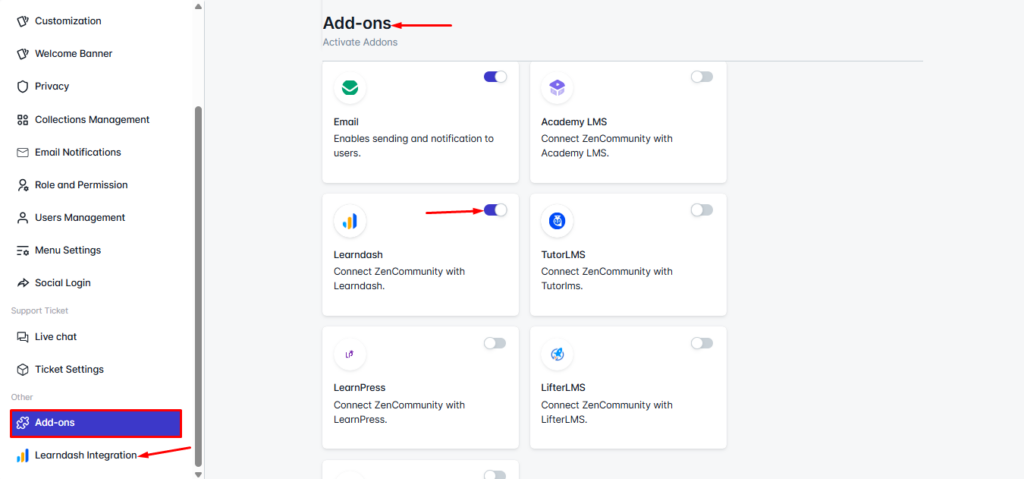
From your Community Feeds, navigate to ZenCommunity Settings. In the ZenCommunity navigation panel, click on the Addons menu. Locate the LearnDash Add-on from the list of available addons. Toggle the switch to enable the integration. Once activated, a new tab named LearnDash Integration will appear in the ZenCommunity settings. Click on this tab to continue.
Configure LearnDash Events for ZenCommunity Feed
In the LearnDash Integration settings (added by the custom add-on), you can define which LearnDash activities should be shared in the ZenCommunity feed.
Suggested Events Include:
- Course Enrolled
- Course Completed
- Topic Completed
- Quiz End
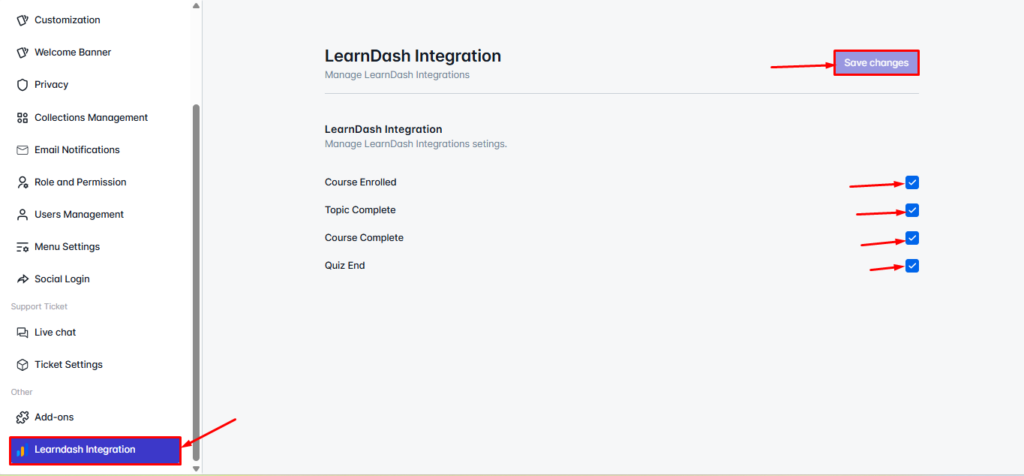
Admins can check or uncheck the events they want to share and then click Save Changes to apply the settings.
Optionally, you can support global or course-specific triggers—for example, sharing events only for selected courses—depending on how granular you want the community feed to be. This setup closely follows the design used in the Academy LMS integration, where admins can choose from multiple event types.
Configure Event Sharing in ZenCommunity Groups
After enabling event sharing globally, ZenCommunity allows group-level configuration to ensure updates appear in the correct context.
Group-Level Setup
- In ZenCommunity Groups, add a “Course Activities / LearnDash Events” section under Group Settings (accessible via the ⋯ menu or similar).
- In this section, group admins can:
- Select which LearnDash events should appear in the group feed
- Associate specific LearnDash course(s) with the group
- Select which LearnDash events should appear in the group feed
- Once all is done, simply save the settings.
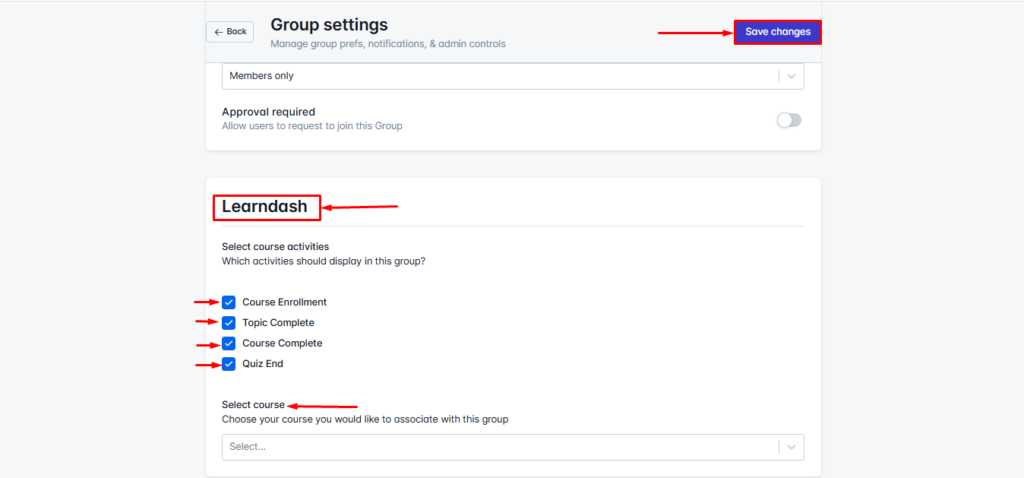
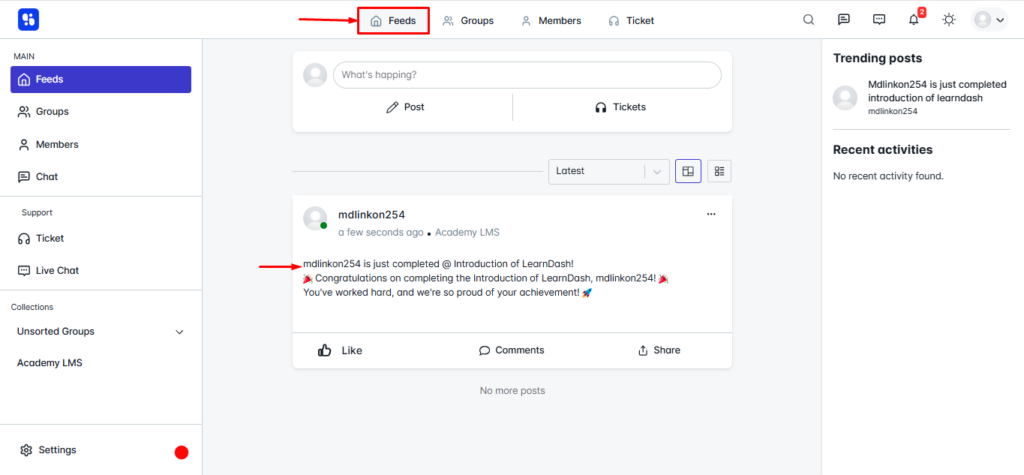
Once configured, whenever a selected LearnDash event occurs—such as a new enrollment or lesson/quiz completion—an automatic post appears in the relevant group’s activity feed. This behavior mirrors the user experience of the Academy LMS + ZenCommunity integration.
Final Thoughts
ZenCommunity transforms standard LearnDash courses into dynamic, interactive learning communities. By combining structured course content with real-time activity updates, discussion forums, and peer collaboration, it creates an engaging experience for both students and instructors.
With ZenCommunity, your LearnDash courses evolve from simple online lessons into a thriving learning hub—enhancing engagement, boosting course completion, and fostering a strong sense of community.
If you’re looking to elevate your online academy, ZenCommunity is the ultimate solution to create collaborative, interactive, and successful courses.