


When we first shipped ZenCommunity, the pitch was simple: your community shouldn’t live on someone else’s platform. Groups, feeds, real-time chat — all of it, native to WordPress, owned by you.
That promise held. But over the last year I watched something happen that I didn’t fully plan for. People weren’t just using ZenCommunity to talk. They were using it to run support. To teach courses. To reward their most active members. The community became the front door to everything else their business did — and our plugin was quietly turning into the operating system for the whole thing.
2.0 is us finally admitting that out loud, and building for it.
This isn’t a feature bump. It’s the release where ZenCommunity stops being “a community plugin with some extras” and becomes a genuine platform — one place where your members hang out, get help, learn, and get recognized, without ever bouncing to a third-party tool. Here’s what shipped, and why each piece mattered enough to build.
We rebuilt the admin from the ground up
Let me start with the least glamorous thing, because it’s the one I’m proudest of.
The old ZenCommunity admin was a collection of WordPress pages that each reloaded the world every time you clicked. It worked. It also felt like software from a different decade.
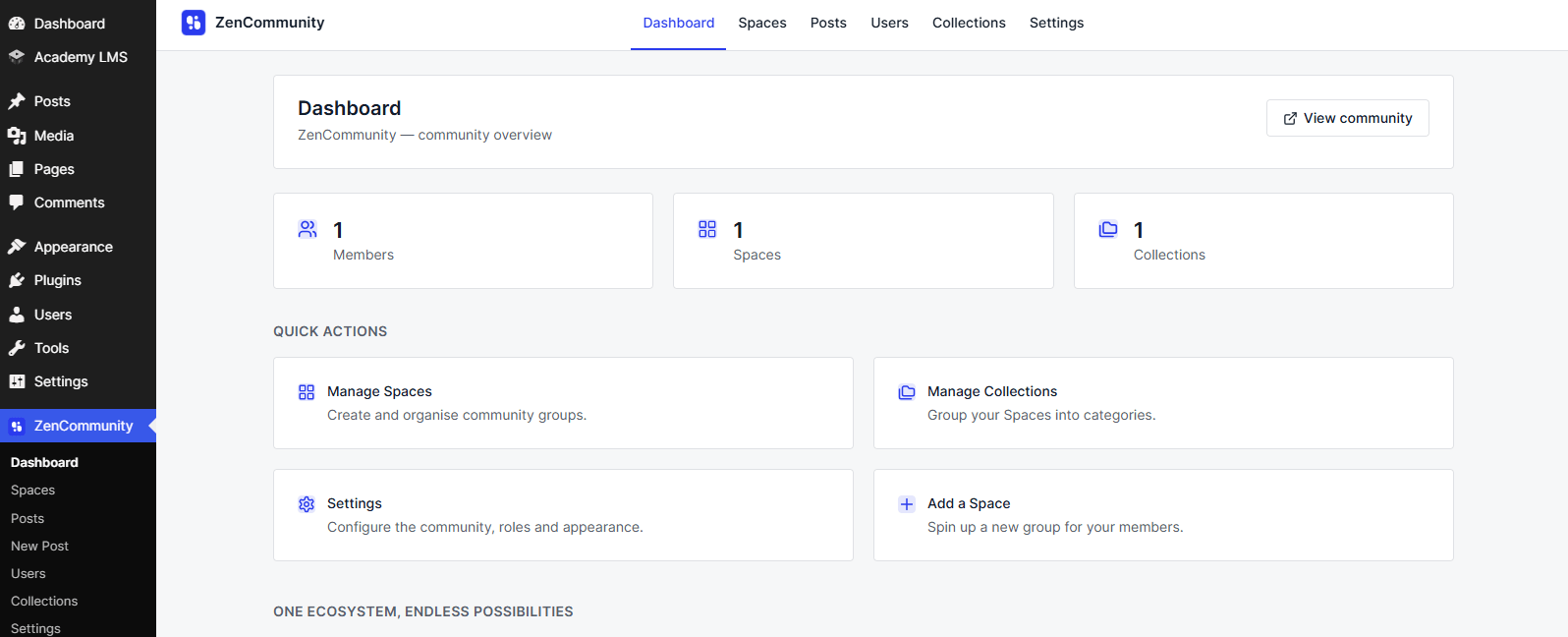
In 2.0, the entire wp-admin experience — Dashboard, Spaces, Posts, Users, Collections, and Settings — is a real client-side app. You click, it navigates. No full-page reloads, no losing your place. We split Users out into its own top-level page instead of burying it in Settings, redesigned every settings screen (General, Brand & Style, Customization, Notifications, Roles, Live Chat, Gamification — all of it) on a clean Tailwind UI, and added small mercies like a PRO badge on premium settings instead of greying them out and hoping you’d figure it out.
Why start here? Because the tools you use to run your community are as much a part of the product as the community itself. If managing your space feels like a chore, you manage it less. We wanted the back office to feel as good as the front.
Build your community layout visually — in the Site Editor
The feature I get the most excited demoing: full Site Editing (FSE) mode.
You can now assemble your community layout right inside the Gutenberg Site Editor, out of a real block catalog — Community Portal, Content Outlet, Content Body, Navigation, Search, and more. There are preset portal layouts to start from, and navigation between blocks happens client-side, so it feels like an app even though you built it by dragging blocks around.
This matters because “native to WordPress” has to mean more than “it’s a plugin.” It should mean your community bends to your design, using the tools WordPress already gives you — not a walled-off template we picked for you.
Your community is now a learning platform and a game
Two integrations in 2.0 change what ZenCommunity fundamentally is.
Academy LMS is now built in. Course catalog, course detail pages, curriculum, enrollment, reviews, and course Q&A — all inside the community. And here’s the part I insisted on: when a member hits “Start learning,” the course player renders directly inside ZenCommunity. No iframe. No redirect to some other page that looks like a different website. It’s a clean, chrome-free view, and “Back to course” drops them right back into the community where they belong. Learning shouldn’t feel like leaving.
GameEngine brings gamification. Points, ranks, badges, a leaderboard, and a member Achievements page. You can point-restrict post content and course certificates, put a member’s badges on their profile, and give people a reason to show up beyond obligation. Communities die from silence; recognition is one of the few things that reliably fights it.
Put these together and the picture is clear: a member can join, learn a course, earn points and a badge for finishing it, get their certificate, and show it all off — without a single tab switch. That’s the whole thesis of 2.0 in one sentence.
Support that actually closes the loop
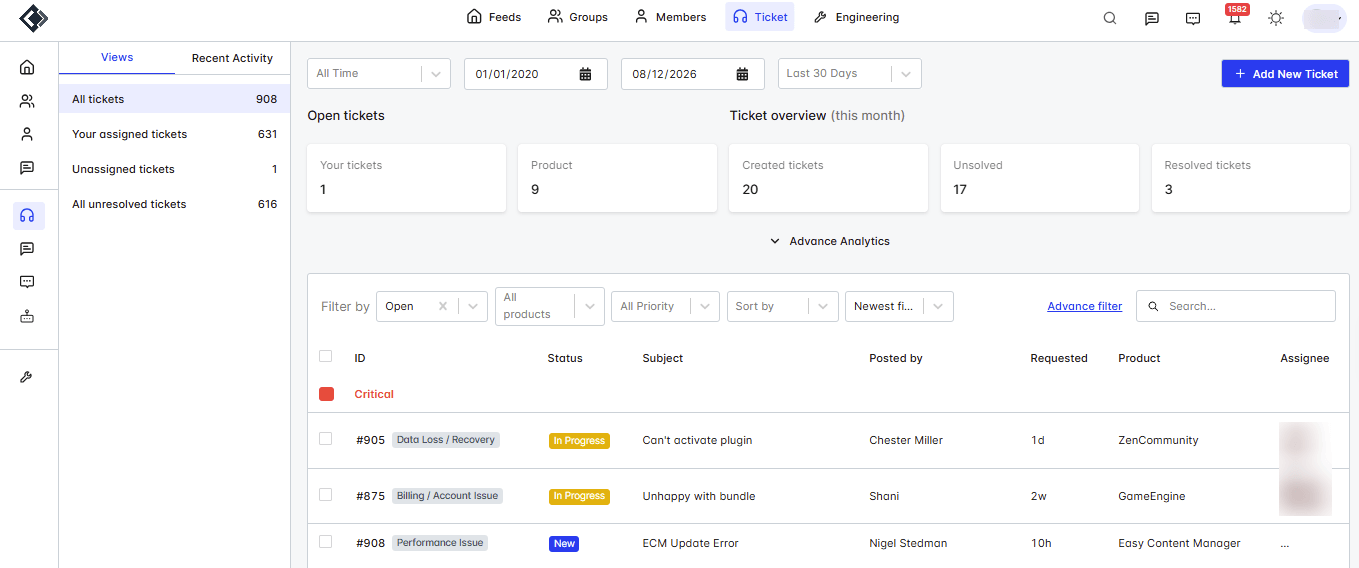
Support has always been part of ZenCommunity’s DNA — turning community posts into tracked tickets, offering live chat. In 2.0 we sharpened the whole loop, especially the ending, which is the part everyone forgets.
The one I love most: post-close CSAT feedback for AI-handled live chats. When an AI conversation wraps, the client gets a single-use, expiring feedback link by email. Their star rating and comment show up inline in the chat thread, and the agent gets a notification linking straight back to the conversation. We added “Recent Feedback” and “Unread Feedback” filters so none of it gets lost. You finally get to see whether the help actually helped.
Alongside that, 2.0 brings ticket close/reopen with proper email notifications and an in-conversation banner, auto-closing for inactive tickets, OTP verification for live chat, ticket search by requester email, and file uploads that finally cover real work — CSV, PDF, DOC, JSON, and ZIP, not just images.
And on the reliability side — the stuff nobody notices until it breaks — the live chat WebSocket now auto-restarts on failure, with an admin-triggerable restart endpoint and cleaner socket teardown. We also fixed a couple of genuinely serious bugs, including a fatal error on ticket creation and a case where a ticket’s “history” panel showed other customers’ tickets. That last one we treated as a five-alarm fire, and it’s gone.
The long tail of “it just feels right now”
I won’t list every fix — the changelog runs long for a reason — but I want to name the category, because it’s where most of our engineering hours actually went.
We chased down dark-mode conflicts across the admin and the feed. We killed the bug where a normal browser refresh could log you out. We fixed doubled submenu URLs, settings tabs that reset on reload, jumping reactions, poll spacing, sticky headers that wouldn’t unstick, blank Settings and Collection pages, and dozens of small alignment and responsiveness issues across tickets, live chat, courses, and profiles.
None of these will make a headline. All of them are the difference between software you tolerate and software you trust. A community platform is something people touch every single day — the papercuts are the product.
Why we built it this way
Every one of these decisions came from the same conviction: fragmentation is the enemy.
The default way to run an online community today is a stack of five subscriptions that don’t talk to each other — a forum here, a course platform there, a help desk, a gamification widget, a chat tool — each one renting you your own audience and taking a cut. Every tool switch is a place where a member drops off. Every integration is a place where data goes stale.
ZenCommunity 2.0 is the bet that it can all live in one place, on infrastructure you own, on WordPress. Community, support, learning, and recognition — one login, one design, one source of truth.
We’re not all the way there. There’s more coming (polls and surveys, a native leaderboard, and plenty we’re not ready to name). But 2.0 is the release where the shape of the whole thing finally came into focus. It stopped being a plugin I could describe in a sentence, and became a platform I’m genuinely proud of.
If you’re already running ZenCommunity, update and go poke around the new admin — I think you’ll feel the difference in the first thirty seconds. If you’re not yet, this is a good moment to start.
Thanks for building your communities with us. We’re just getting warmed up.