


LearnPress has established itself as one of the most popular WordPress LMS (Learning Management System) plugins, empowering thousands of educators and organizations to create and sell online courses. However, creating courses is just one part of building a successful online learning platform. The real challenge lies in keeping students engaged, fostering peer-to-peer learning, and building a thriving educational community around your content.
This is where ZenCommunity comes in. By integrating ZenCommunity with LearnPress, you can transform your standard course website into a dynamic learning ecosystem where students don’t just consume content—they connect, collaborate, and grow together.
Understanding the Limitations of LearnPress Alone
What LearnPress Does Best
LearnPress excels at course creation and management. It provides essential features like lesson organization, quizzes, certificates, and progress tracking. For instructors focused purely on content delivery, these features are often sufficient.
The Engagement Gap
However, LearnPress on its own lacks robust community features. Students complete lessons in isolation, questions go unanswered between instructor responses, and peer-to-peer learning opportunities are limited. This creates several problems:
- Low completion rates – Students lack accountability and motivation from peers
- Limited networking – Learners miss opportunities to connect with like-minded individuals
- Reduced value perception – Courses feel transactional rather than transformational
- Minimal word-of-mouth growth – Without community bonds, referrals remain limited
What is ZenCommunity?
ZenCommunity is a powerful WordPress community plugin designed to add social networking and community features to any WordPress website. It enables you to create discussion forums, member profiles, activity feeds, groups, and much more—all seamlessly integrated into your existing WordPress site.
Key Features of ZenCommunity
Member Profiles – Each student gets a personalized profile where they can showcase their learning journey, achievements, and connect with other members.
Discussion Forums – Create topic-based forums where students can ask questions, share insights, and help each other learn.
Groups & Communities – Allow students to form study groups, cohort-based communities, or interest-based circles.
Activity Feeds – Keep members engaged with a social feed showing course completions, new discussions, and member activities.
Private Messaging – Enable direct communication between students for collaboration and networking.
Notifications – Keep members informed about replies, mentions, and community activities.
Why Combine LearnPress with ZenCommunity?
Creating a Complete Learning Ecosystem
When you integrate LearnPress with ZenCommunity, you’re not just adding community features—you’re fundamentally transforming the learning experience. Here’s how this combination creates value:
Enhanced Student Engagement
Students who feel connected to a community are significantly more likely to complete courses. ZenCommunity provides the social glue that keeps learners coming back, even when course content becomes challenging.
Peer-to-Peer Learning Opportunities
Research consistently shows that students learn effectively from their peers. With ZenCommunity forums and groups, students can share different perspectives, explain concepts in their own words, and learn from each other’s questions and insights.
Reduced Instructor Workload
When students can answer each other’s questions in community forums, instructors spend less time on repetitive support requests and more time creating quality content and engaging in higher-level discussions.
Increased Course Value
Courses with active communities can command higher prices. Students aren’t just buying content; they’re buying access to a network of peers, ongoing discussions, and a support system that extends far beyond the course material.
Better Student Outcomes
Community accountability and support lead to higher completion rates, better retention of material, and more practical application of learned concepts.
What You’ll Need Before Starting
Ensure the following requirements are met:
- LearnPress must be installed and running on your WordPress website.
- ZenCommunity must be installed and active on your WordPress website.
Both plugins need to be operational for the integration to work correctly.
Activate the LearnPress Add-on in ZenCommunity
To integrate LearnPress with ZenCommunity, you need to enable the integration add-on:
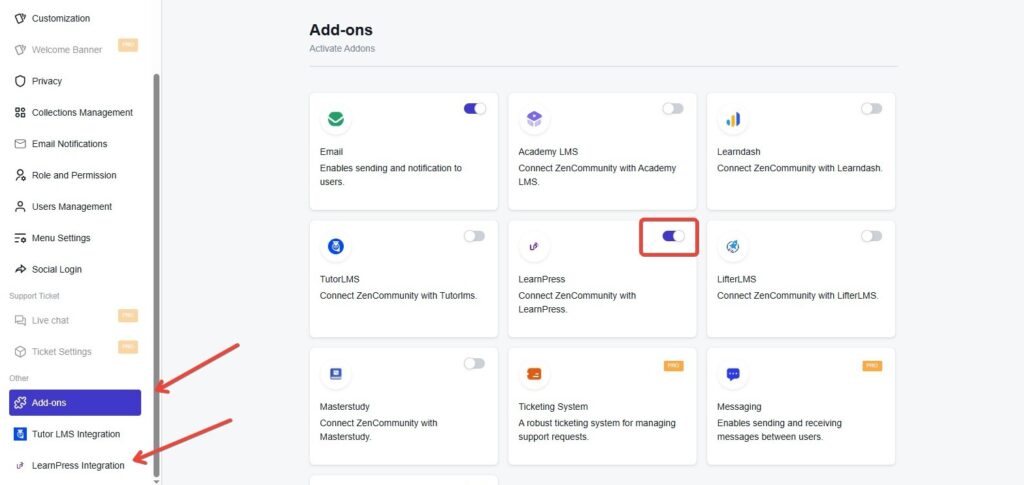
- Go to your WordPress dashboard and access ZenCommunity settings.
- Click on Settings from the ZenCommunity feeds section.
- Locate and select the Addons menu in the ZenCommunity navigation panel.
- Find the LearnPress Add-on from the list of available addons.
- Toggle the switch to turn it on.
Once enabled, a new tab called LearnPress Integration will appear in your ZenCommunity settings panel. Click on this tab to proceed with configuring the integration.
Choose LearnPress Activities to Show in Your Community
After enabling the add-on, you can decide which LearnPress activities will appear in your ZenCommunity feed.
The integration provides 7 event types that can be linked between LearnPress and ZenCommunity:
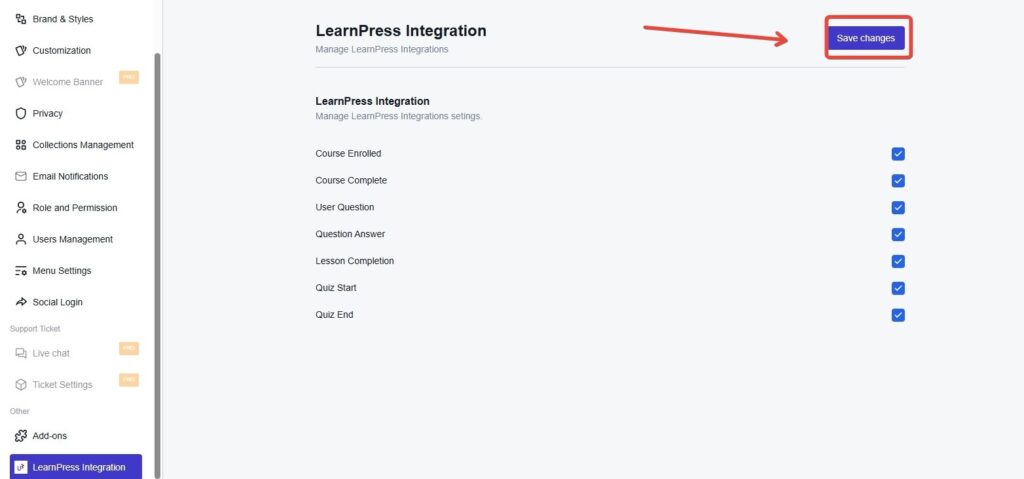
- Course Enrolled
- Course Complete
- User Question
- Question Answer
- Lesson Completion
- Quiz Start
- Quiz End
To enable your preferred events:
- Check the box next to each event you want to activate.
- After making your choices, click Save Changes to apply your settings.
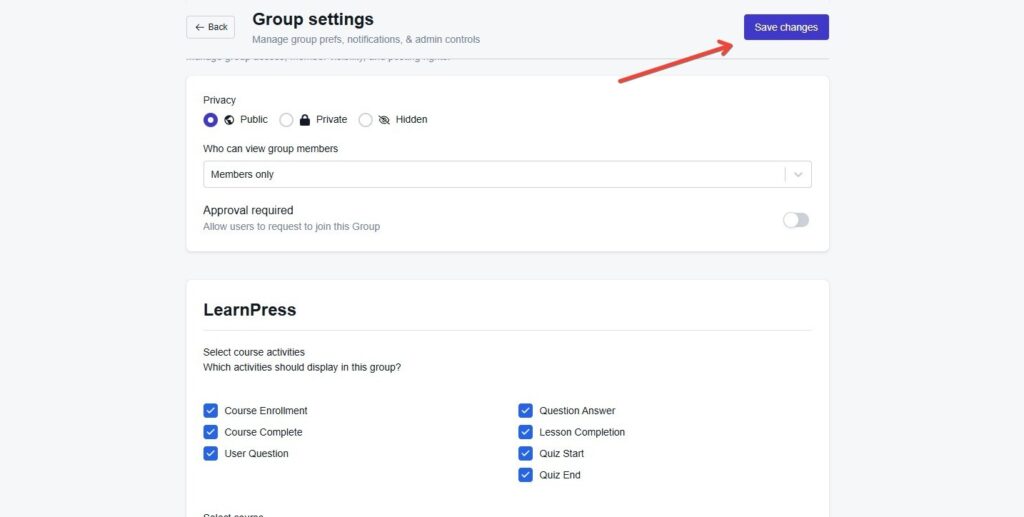
Configure Course Activity Events for ZenCommunity Groups
Next, you’ll determine which course activities display in specific community groups.
Navigate to your selected group in ZenCommunity.
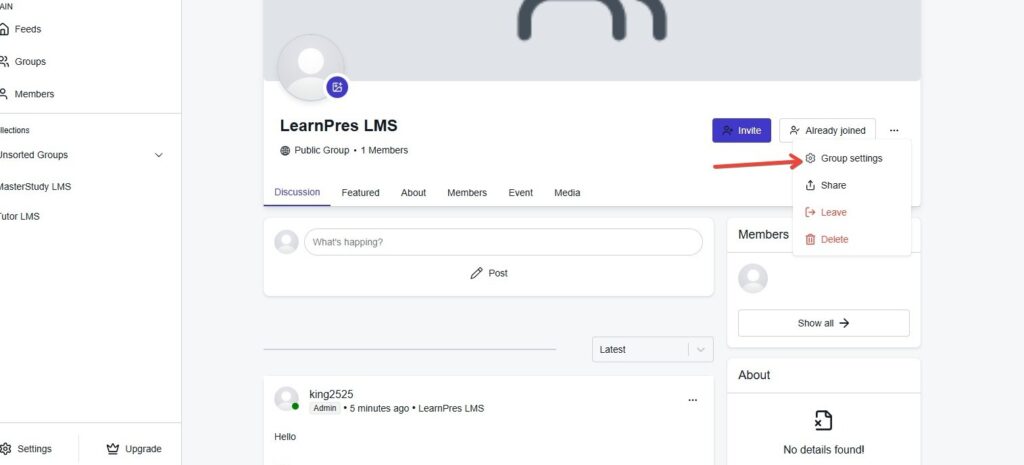
- Click the three-dot menu icon (⋯) next to the group name.
- Select Group Settings from the dropdown menu.
- Scroll down to find the Course Activities Event section.
- Choose which events you want shown in this group.
- Select the course(s) you want linked to these activities.
- Click Save Changes to confirm your group settings.
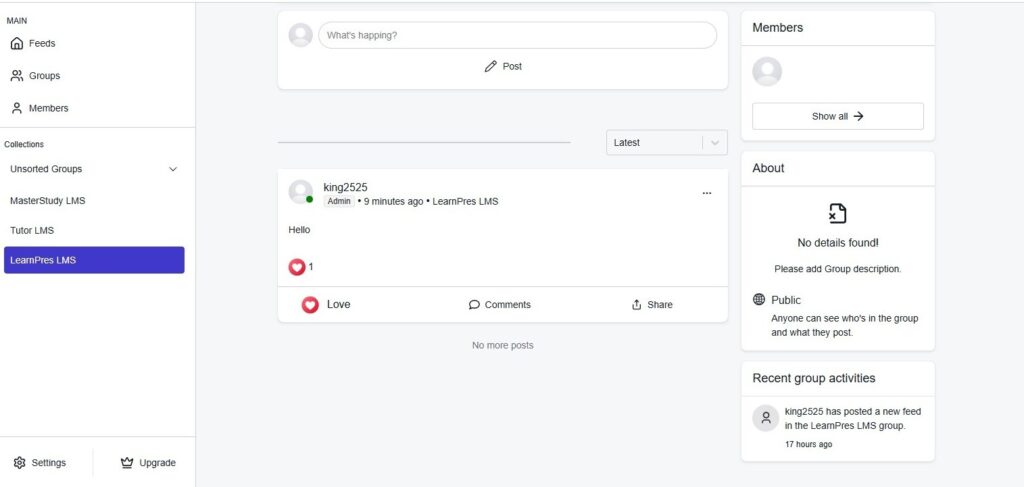
After setup is complete, your chosen course events—like enrollments, quiz completions, or certificates earned—will automatically create posts in the group’s activity feed.
Best Practices for Community Management
Establish Clear Guidelines
Create comprehensive community guidelines that set expectations for respectful interaction, appropriate content, and helpful behavior. Pin these guidelines in your main forum.
Seed Initial Discussions
New communities need momentum. As the course creator, start meaningful discussions, ask thought-provoking questions, and encourage students to introduce themselves and share their goals.
Recognize and Reward Participation
Regularly acknowledge helpful community members. Feature their contributions, award badges, or even offer advanced courses or one-on-one sessions to top contributors.
Moderate Consistently
Assign moderators or use ZenCommunity’s moderation tools to keep discussions on-topic, remove spam, and address conflicts quickly and fairly.
Create Regular Community Events
Schedule weekly challenges, monthly networking sessions, or quarterly expert interviews. Regular events give community members reasons to return and engage.
Encourage User-Generated Content
Invite students to create and share their own tutorials, case studies, or success stories. This builds ownership and creates valuable peer-generated learning resources.
Conclusion
Extending LearnPress with ZenCommunity transforms your online courses from isolated learning experiences into vibrant educational communities. This combination addresses the fundamental human need for connection while dramatically improving learning outcomes and business metrics.
The investment in community building pays dividends through higher completion rates, increased student satisfaction, stronger word-of-mouth marketing, and enhanced course value. Students don’t just learn from your content—they learn from each other, build professional networks, and become advocates for your platform.
Start small with basic forums and groups, then expand your community features as engagement grows. Listen to your students, iterate on what works, and remember that building community is a long-term investment that compounds in value over time.
The future of online education isn’t just about delivering content—it’s about creating environments where learning thrives through human connection. With LearnPress and ZenCommunity working together, you have all the tools needed to build that future today.