


Creating a successful eLearning website today is about much more than uploading videos and publishing quizzes. Modern students expect interaction, support, and a sense of belonging—just like they experience on social platforms. When learners feel connected to instructors and peers, they are far more likely to stay engaged, complete their courses, and recommend the platform to others.
By integrating MasterStudy LMS with ZenCommunity, you can transform a standard WordPress course website into a fully interactive learning community. Instead of students learning alone in isolation, they become part of active groups where progress is visible, discussions are encouraged, and motivation is shared.
This guide explains how to connect MasterStudy LMS with ZenCommunity, how to link courses with community groups, and how to display learning activity directly inside community feeds to create a truly social learning experience.
Why Use ZenCommunity with MasterStudy LMS?
MasterStudy LMS is powerful when it comes to delivering structured online courses. It handles content, quizzes, lessons, certificates, and progress tracking very well. However, most LMS platforms are missing one critical element: social interaction.
That is where ZenCommunity comes in.
ZenCommunity adds a social layer on top of your LMS, turning static course pages into living communities. Instead of students only interacting with content, they can now interact with each other and with instructors in real time.
With this integration, you get:
- Course-based community feeds
- Automatic activity sharing
- Group discussions for every course
- Instructor–student interaction
- Social motivation and accountability
Together, MasterStudy LMS and ZenCommunity create a complete learning ecosystem—one that supports both structured education and human connection.
Why Use Community for eLearning Sites
One of the biggest challenges in online education is drop-off. Many students enroll in courses but never finish them. The reason is simple: learning alone is hard.
A community changes everything.
When students learn inside a community, they are no longer isolated. They see others enrolling, completing lessons, passing quizzes, and finishing courses. This creates a powerful sense of progress and shared momentum.
Here is why community is essential for modern eLearning:
1. Motivation Through Visibility
When students see others making progress, it encourages them to keep going. A simple post like “Sarah completed Lesson 5” or “John finished the course” motivates others to do the same.
2. Peer-to-Peer Support
Students can ask questions within their course group instead of feeling stuck. Often, another student can help before the instructor even needs to step in.
3. Stronger Student Retention
People are far more likely to return to a platform when they feel part of a group. A community creates emotional attachment, not just academic interest.
4. Instructor Presence
Instructors can comment, encourage, and guide students directly inside groups, making the learning experience feel personal instead of automated.
5. Better Learning Outcomes
Discussion, reflection, and collaboration help students understand topics more deeply than passive watching alone.
By adding ZenCommunity to MasterStudy LMS, you bring all of these benefits directly into your WordPress learning platform.
Plugin Requirements
Before you begin, make sure you have the following plugins installed and activated:
- MasterStudy LMS (latest free version)
- ZenCommunity (latest free version)
Both plugins are designed to work smoothly together without additional paid extensions.
Step 1: Enable the MasterStudy LMS Add-ons
The first step is to activate the MasterStudy integration inside ZenCommunity.
From your WordPress dashboard:
- Go to ZenCommunity → Settings
- Click Add-ons
- Find MasterStudy LMS
- Toggle it ON
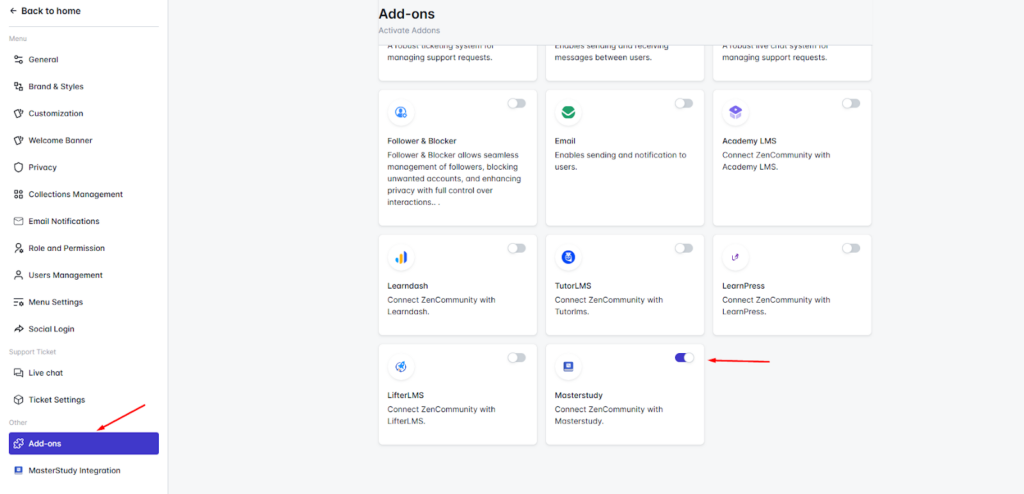
Once enabled, a new menu item called MasterStudy Integration will appear inside the ZenCommunity menu.
This add-on is what allows ZenCommunity to listen to LMS events and convert them into community activity.
Step 2: Configure MasterStudy Events
Now go to:
ZenCommunity → MasterStudy Integration
This panel lets you decide which learning actions should be shared in the community feed.
You can enable any or all of the following:
- Course Enrolled
- Topic Completed
- Course Completed
- Quiz End
After selecting the events you want, click Save Changes.
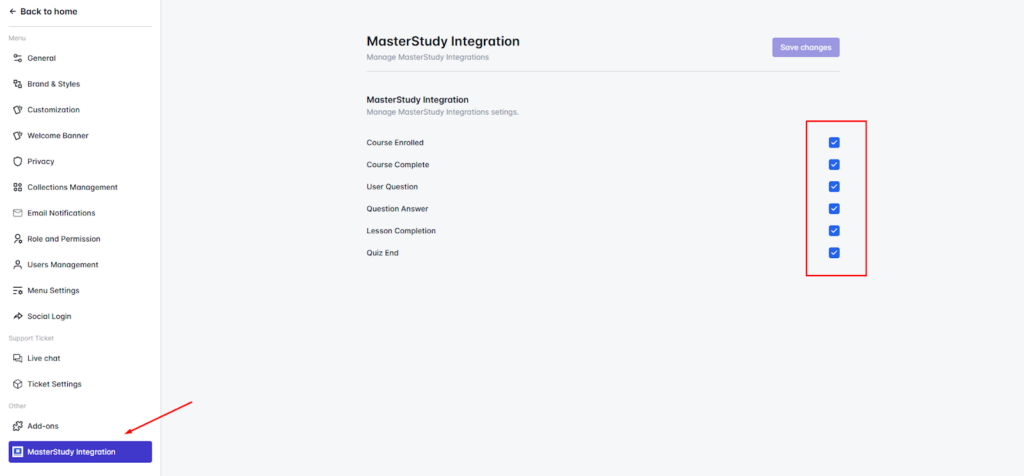
These events are the backbone of your learning community. They control what students see in their group activity feed.
Step 3: Connect Courses to Community Groups
ZenCommunity uses Groups to organize members around shared interests—just like Facebook Groups. Each MasterStudy course can be connected to its own group.
To link a course:
- Open any ZenCommunity Group
- Click Group Settings
- Scroll to the MasterStudy LMS section.
Inside this panel, you can:
- Select which LMS events should appear for this group
- Choose which MasterStudy course this group is connected to
After selecting the course and options, click Save Changes.
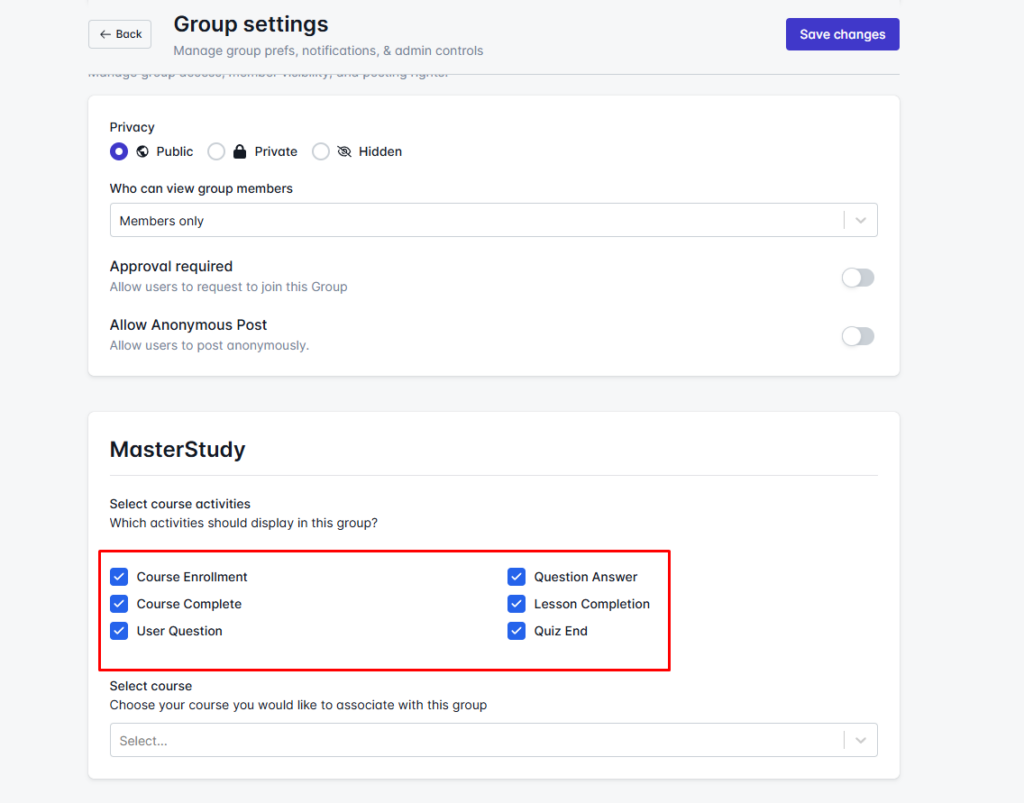
Now this group becomes the official community for that specific course.
What Happens After Setup
Once everything is connected, ZenCommunity automatically starts displaying learning activity inside the correct course groups.
Here is what your students will see:
When a student enrolls in a course
A post appears in the group announcing their enrollment.
Other members can welcome them or offer help.
When a lesson or topic is completed
A progress update is posted in the group feed.
This shows that learning is actively happening.
When a quiz is finished
A quiz completion post appears.
Students can discuss results or tips.
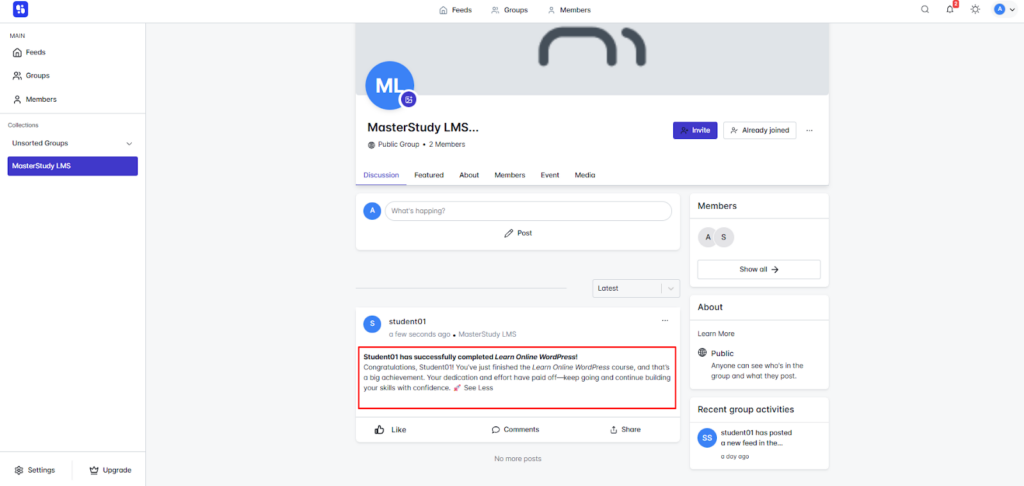
When the course is completed
A celebration post is published for everyone to see.
This builds pride, motivation, and credibility.
All of these updates are interactive. Members can comment, react, and discuss—turning individual progress into a shared learning experience.
Why This Dramatically Increases Engagement
This integration transforms MasterStudy from a traditional LMS into a social learning system.
- Students see each other’s progress.
- Instructors interact directly in groups.
- Learning becomes visible and motivating.
- Communities grow around every course.
Instead of logging in, watching a video, and leaving, students stay to read updates, join discussions, and support each other.
This leads to:
- Higher course completion rates
- Longer time spent on your site
- Stronger student loyalty
- Better reviews and referrals
Final Thoughts
With ZenCommunity + MasterStudy LMS, your courses become more than just videos and quizzes. They become active learning communities where students feel connected, supported, and motivated.