



Circle has gained popularity among community builders and offers a polished experience. Yet, many creators are beginning to hit their limitations, with monthly fees adding up, no data ownership, and limited customization.
With WordPress, you have more control—you own your data, design your community freely, and pay far less.
In this post, we will discuss the most appropriate Circle alternatives that are developed on WordPress. And we will prove to you that ZenCommunity is the whole package in 2026.
The Reason Why Online Communities Are Important to Your Business
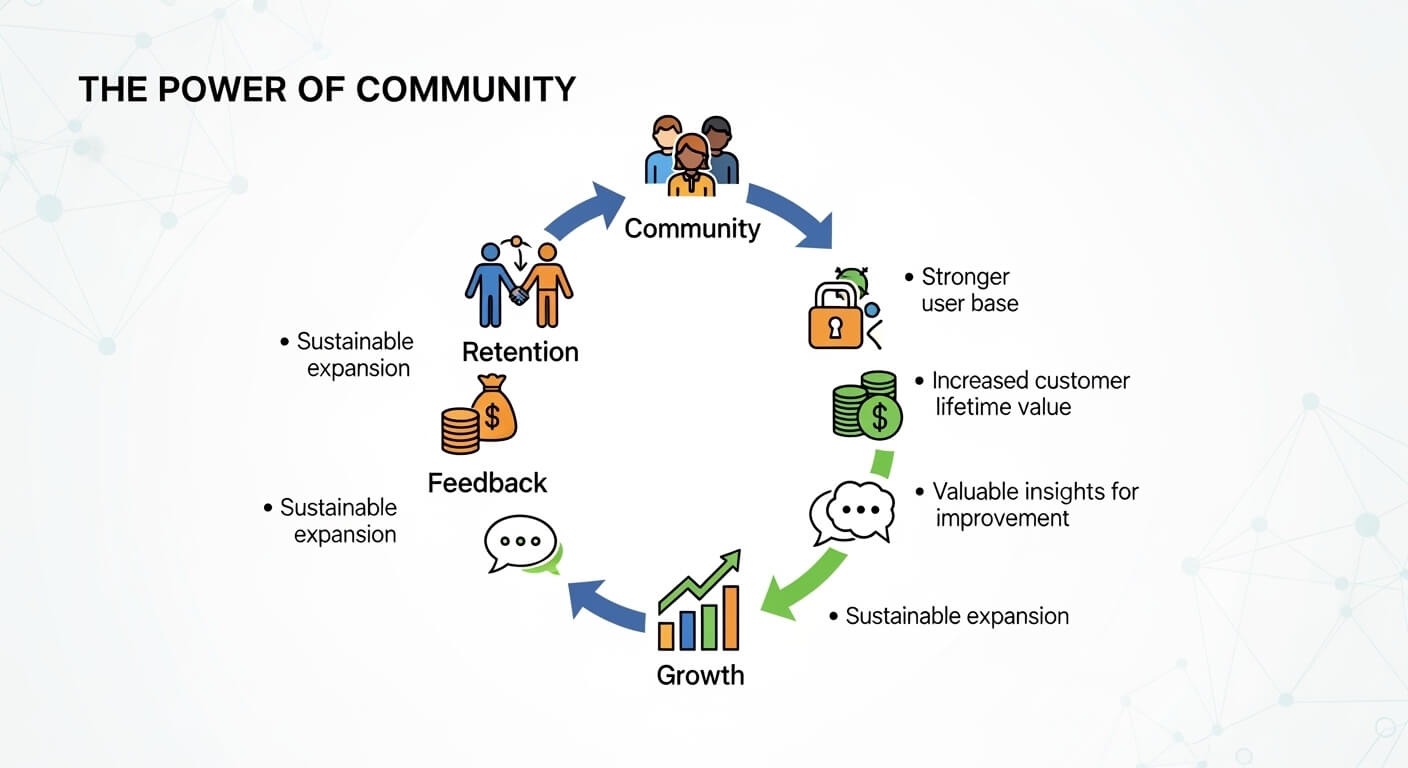
Firstly, why do you even require a community?
- Customer Retention Becomes Easier: Members stay longer when they feel connected.
- Your Marketing Goes Organic: Happy users share your content naturally.
- Intelligent Product Development: Feedback from members helps you build better.
- Support Costs Drop: Peer-to-peer help lightens your workload.
- More Revenue Opportunities Multiply: Communities create new ways to monetize.
What to Expect in a Circle.so Alternative
Community tools are not made equal. Look for platforms that provide:
- Ownership: Can you self-host and control your data?
- Customization: Can you customize every visual element to fit your brand?
- Features: Groups, messaging, feeds, mobile support?
- Price: Affordable as your community grows?
- Integrations: Works with your WordPress tools?
- Support: Reliable help available when needed?
- Scalability: Can it grow with your community?
The Best Circle Alternatives for WordPress Users
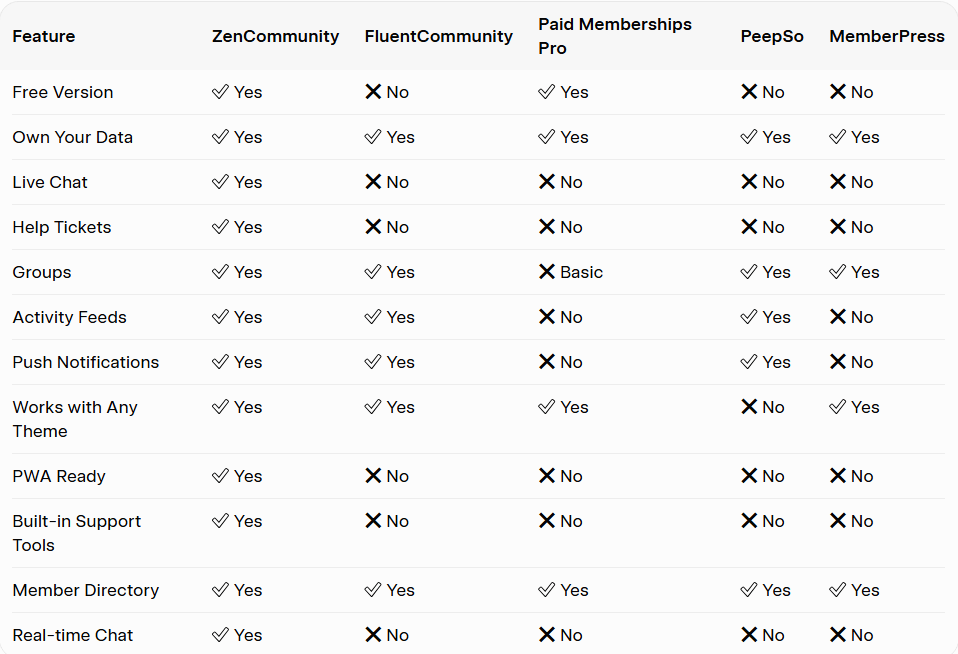
We have selected five of the best competitors. Each has strengths, but one stands out above the rest.
1. ZenCommunity
The All-in-One WordPress Community Solution

This plugin combines groups, social feeds, help desks, and chat into a single, fast, all-in-one framework. A cost-effective solution for anyone demanding unrestricted control over their community environment.
Key Features:
- Complete member profiles that have custom fields and cover images
- Conditional dynamic activity feeds with likes, reactions, and comments
- Live Chat groups, both public and private
- In-built customer support tickets
- Instant visitor help live chat widget
- Supports any theme to work with WordPress—no lock-in
- PWA is prepared to be app-like on phones
- Community activity notification by email
- Member directory, search, and filters
- Role-based access controls
Why Choose This Plugin:
By keeping your data on your own server, you maintain full ownership and total creative freedom. Beyond standard community tools, this plugin offers features Circle lacks, such as built-in help tickets and live chat. Ultimately, ZenCommunity stands out as the definitive choice for WordPress users seeking flexibility.
Ideal For:
- Instructors needing student support tools
- Brands requiring complete design control
- Companies managing customer queries
- Anyone tired of monthly platform charges
2. FluentCommunity
Great for Course Creators
FluentCommunity is brought about by the makers of FluentCRM and FluentForms. It is a fairly new competitor that is already gaining attention in the WordPress space.
Key Features:
- Close connection with FluentCRM email marketing
- Features of course-centered communities
- Modern, clean interface
- Good for e-learning spaces
- Activity feeds and groups
- Member profiles
- Popular LMS integration
Why Choose FluentCommunity:
Compatibility is a major draw for those already within the Fluent ecosystem. Because it integrates deeply with existing course creator tools, the setup feels seamless. Additionally, users will appreciate the contemporary and clean interface that works right out of the box.”
Ideal For:
- Existing FluentCRM users
- The authors of the courses concentrated on e-learning
- Individuals who prefer a contemporary appearance
Limitations:
- No built-in help tickets
- No live chat feature
- More recent and having fewer users
3. Paid Memberships Pro
Best for Membership Sites
Paid Memberships Pro is not a new concept. It is a great option if memberships are your main priority. It is used on millions of sites to manage paid content.
Key Features:
- Membership management strength
- Several payment gateways are accepted
- Content restriction tools
- An extensive add-on library for additional features
- Promotions and discount codes
- Member management dashboard
- Member email communication settings
- Support of numerous WordPress integrations
Why Choose Paid Memberships Pro:
It works well if your community mainly focuses on gated content and membership tiers. The community features are fairly basic, but the membership tools are very powerful. Add-ons will help you add community functionality.
Ideal For:
- Content access websites
- Websites that require complicated payment regulations
- Budget-conscious startups
Limitations:
- At the centre of basic community features
- Needs social functionality add-ons
- No built-in activity feeds
4. PeepSo
Visual Excellence with PeepSo
PeepSo features a clean, modern design that looks impressive by default, though it has some compromises.
Key Features:
- Attractive-looking profiles and status feeds
- Mobile-friendly design
- Additional features through different add-ons
- Groups and messaging
- Photo and video sharing
- Friend connections
- Notification system
Why Choose PeepSo:
If design is your top priority and you’re willing to pay for extra features, PeepSo offers an attractive look. Its interface is smooth and modern, but costs can increase as you add more functionality.
Ideal For:
- Places in which design takes precedence
- The ones who are ready to spend on numerous add-ons
- The communities are a social network style
Limitations:
- Needs its theme to perform optimally
- Add-on costs stack up
- None of the built-in help tickets and live chat
- Many add-ons can be harmful to performance
5. MemberPress
The Membership Heavyweight
MemberPress is well known for powering membership websites. They have also introduced community functionality recently to compete with all-in-one solutions.
Key Features:
- Efficient course and membership features
- Access policies and content dripping
- Integration with numerous external applications
- Course builder included
- Payment processing built-in
- Coupon and promotion tools
- Hooks and APIs have made it developer-friendly
Why Choose MemberPress:
If you’re already using MemberPress to sell memberships, its community add-on lets you manage everything in one place. It is a good option among current users who do not need to transfer to other platforms to have community functions.
Ideal For:
- Current MemberPress users
- Those sites that require a good membership
- Producers of courses who desire everything
Limitations:
- The community characteristics are more recent and untested
- A community add-on is required to enable community features.
- No built-in help tickets
- No live chat
Which Tool Should You Choose?
- Course Creators: Our top pick is ZenCommunity, which integrates well with learning tools.
- Membership Sites: Paid Memberships Pro or MemberPress excel at managing members and payments. Add the plugin for social features.
- Brand Communities: The all-in-one solution gives full control over design with no platform fees.
- Small Budgets: Start free with our top pick or Paid Memberships Pro, upgrade when ready.
- Course-Heavy Businesses: Built-in help tickets allow support directly inside the community.
- Existing FluentCRM Users: FluentCommunity integrates seamlessly.
Why WordPress Users Should Avoid Hosted Platforms
Circle and similar platforms look easy—but here’s what they don’t tell you:
- Data Ownership: Hosted platforms hold your data; if they close or raise prices, your community is at risk.
- Subscription Costs: Monthly fees never stop. WordPress allows one-time payment and full ownership.
- Design Freedom: Hosted solutions restrict creativity, resulting in cookie-cutter communities.
- Locked Integrations: You can’t choose what connects.
- Zero Portability: Moving members elsewhere is nearly impossible.
WordPress gives freedom; this plugin gives the tools to use it effectively.
Conclusion

Circle works and looks nice, but WordPress users get more control, more features, and lower costs with the right plugin.
Our top pick leads the pack. It unites social features, live chat, and help tickets in one package. You own your data, save money, and get everything Circle offers—plus more.
FluentCommunity, Paid Memberships Pro, PeepSo, and MemberPress have strengths, but for complete ownership and true value, this plugin wins.
Stop piecing together tools or relying on hosted platforms. WordPress gives freedom; the all-in-one solution gives the tools to use it.
Ready to build your community your way? Start free, upgrade when ready.
Your community. Your way. At your fingertips.
Frequently Asked Questions
What is the best Circle alternative for WordPress?
Our top choice brings together groups, activity feeds, live chat, and help tickets in a single plugin, giving you complete control and customization.
Is there a free alternative to Circle for WordPress?
Yes. This plugin offers a robust free version on WordPress.org, and Paid Memberships Pro provides a free core version.
Which is cheaper: Circle or WordPress plugins?
WordPress is far cheaper long-term. Circle charges monthly fees indefinitely. Self-hosted solutions save thousands over a few years.
Does it work with my existing WordPress theme?
Absolutely. Compatible with any high-quality theme, seamlessly aligning with your brand’s identity.
Can I offer courses in my community site?
Yes. Integrates with LearnDash, LifterLMS, and Tutor LMS for seamless course and community features.
What kind of support is offered?
Dedicated support from real people—no long waits for responses.
Is it good for large communities?
Yes. Clean, fast code handles hundreds of concurrent users without slowing down.