


For years, building a Facebook Group was the gold standard for community growth. But in 2026, we’re facing a “Reach Crisis.” Between plummeting organic reach and the Distraction Dilemma—where your content competes with ads and viral noise—Facebook has become a “bustling town square” that’s impossible to teach or sell in.
The solution? Stop building on rented land. The smartest creators are migrating to WordPress to build owned property. This guide explores the best tools for the job, with a deep dive into why ZenCommunity is the modern powerhouse leading this migration.
Why Facebook Groups Are No Longer Enough
Relying on a Facebook Group for your business is like building a skyscraper on a 99-year lease. It feels solid until the landlord decides to raise the rent or tear it down.
1. Lack of Data Ownership
This is the non-negotiable truth of digital business. If Facebook decides your group violates an obscure policy, or if a technical glitch wipes out your data, your community—and your business—evaporates instantly. You have no phone numbers, no email addresses, and no way to reconnect with your people. On WordPress, you own the database. You own the emails. You have a direct, unmediated line to your audience.
2. The Distraction Factor
You are not just competing with other content creators; you are competing with the entire internet. In a Facebook Group, your members are just one click away from a marketplace, a puppy video, or a heated political debate.
The platform’s very DNA is designed to pull attention away from your corner of it and back into the endless feed.
3. Limited Monetization & Integration
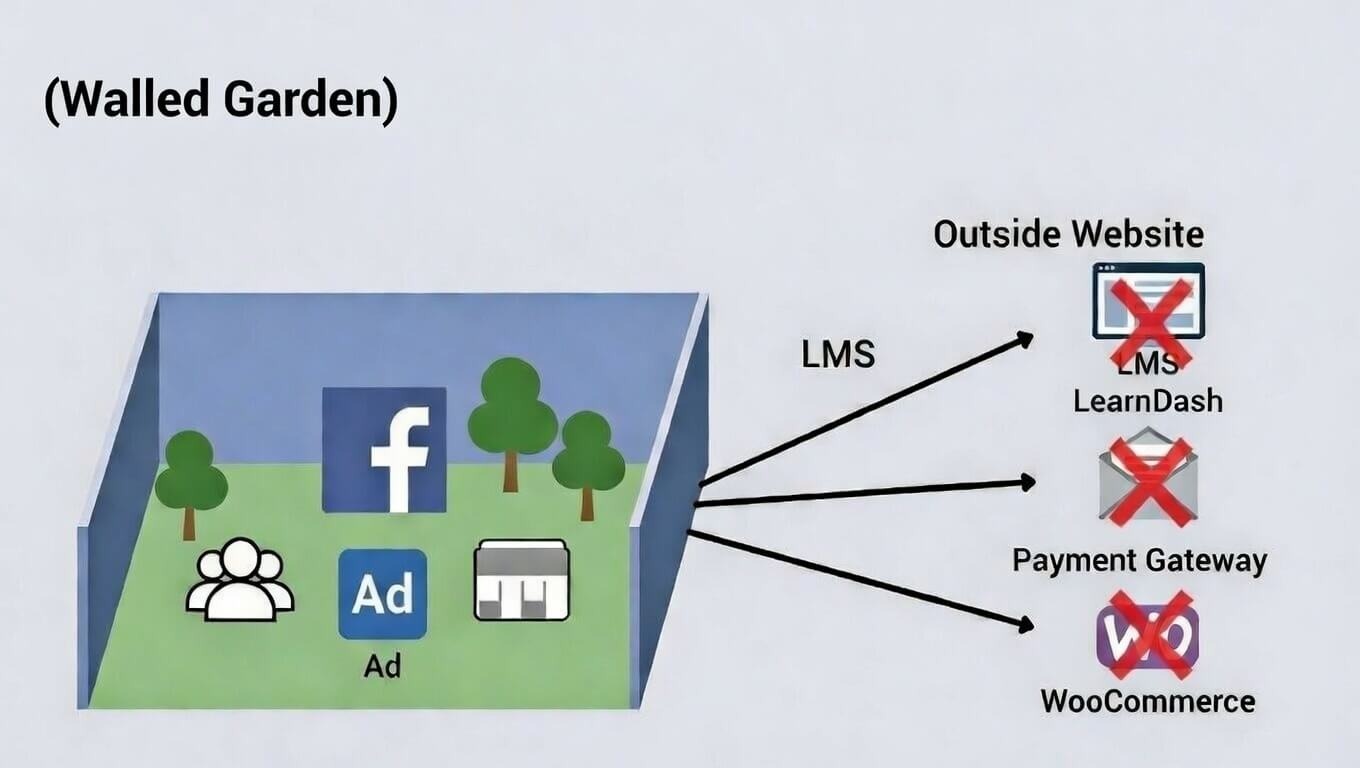
Facebook is a walled garden. It doesn’t play well with others. Want to seamlessly integrate your group with your Learning Management System (LMS) so a course completion automatically triggers a “congrats” post and a new badge? Good luck. Providing customer support within a Facebook Group while keeping it synced with your help desk is not an option. This technical friction results in a poor user experience and ultimately costs you revenue.
Top WordPress Facebook Group Alternatives Compared
Let’s look at the major players building the future of online communities on WordPress.
1. ZenCommunity: The All-in-One Powerhouse
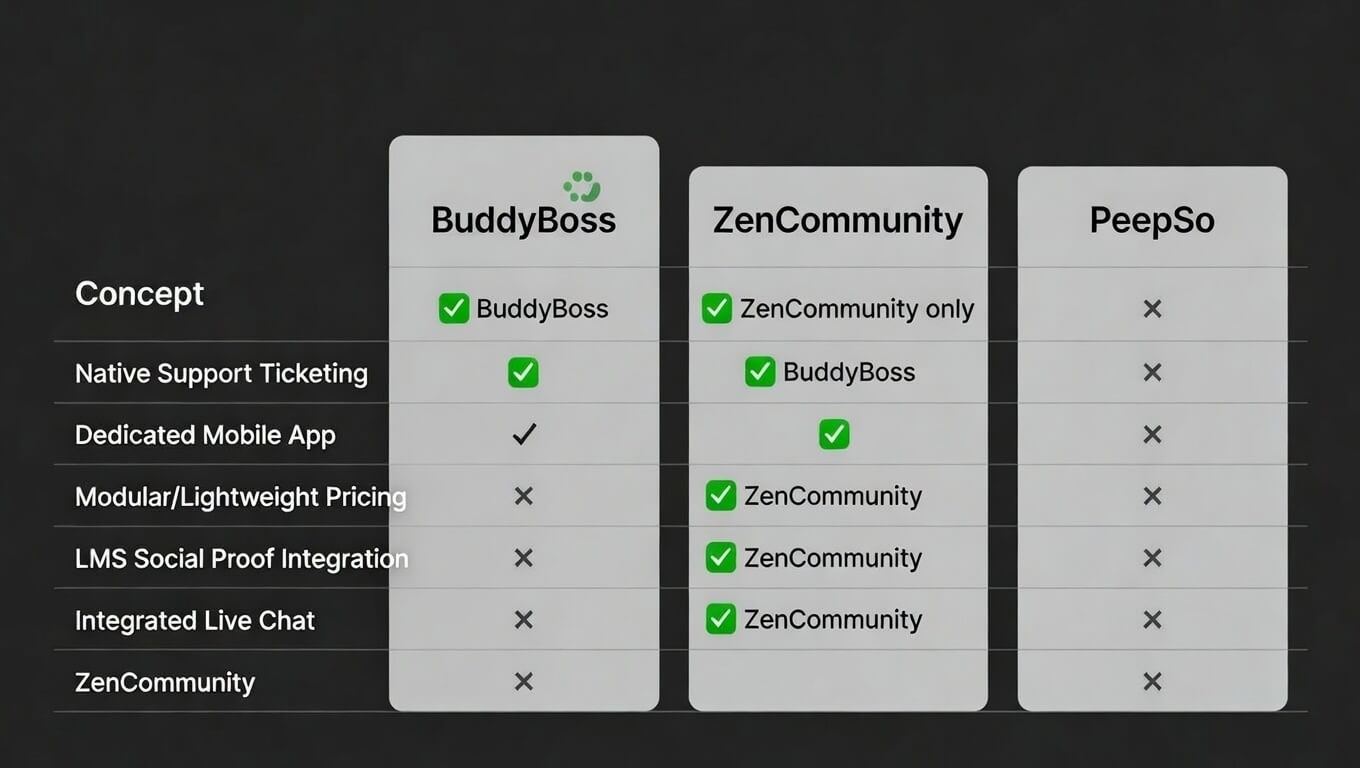
- Key Feature: ZenCommunity is the only tool that intelligently blends a social feed with a native support ticketing system. It recognizes that in many communities, the line between “peer discussion” and “customer support” is blurred.
- Best For: SaaS founders, online course creators, and membership site owners who want to handle community engagement and customer support in one seamless, branded environment.
- The “Why”: It’s built for speed and conversion, ensuring your community page loads instantly, keeping engagement high and support tickets low.
2. BuddyBoss: The Industry Veteran
- Key Feature: For years, BuddyBoss has been the go-to solution, known for its massive feature set and the ability to create a dedicated, branded mobile app for iOS and Android.
- The Trade-off: With great power comes great complexity and cost. BuddyBoss can feel bloated and requires a significant investment in both setup and ongoing licensing, making it potentially overkill for smaller creators.
3. PeepSo: The Social Networking Specialist
- Key Feature: PeepSo takes a refreshingly modular approach. You start with a lean core and add only the features you need—like galleries, videos, or groups—paying for them as you go.
- Best For: Those who want a pure, lightweight social network experience without the extra bells and whistles of an LMS or support integration.
Deep Dive: Why ZenCommunity is the Modern Choice
In a world of noisy forums and bloated suites, ZenCommunity stands out by focusing on the core of what makes a community thrive: real-time, meaningful interaction.
- The Real-Time Experience: Say goodbye to the static, thread-based forums of the past. ZenCommunity offers a sleek, “Messenger-style” interaction feed that feels native to 2026. It’s fast, fluid, and encourages the kind of back-and-forth dialogue that builds real relationships.
- Native LMS Synergy: This is where ZenCommunity changes the game. It’s designed to integrate seamlessly with popular LMS platforms like Academy LMS, Tutor LMS, and LearnDash. Imagine a feed where a member’s new course certificate or completed lesson is automatically shared as a post. This isn’t just social proof; it’s motivational rocket fuel for the rest of your students, creating a culture of achievement.
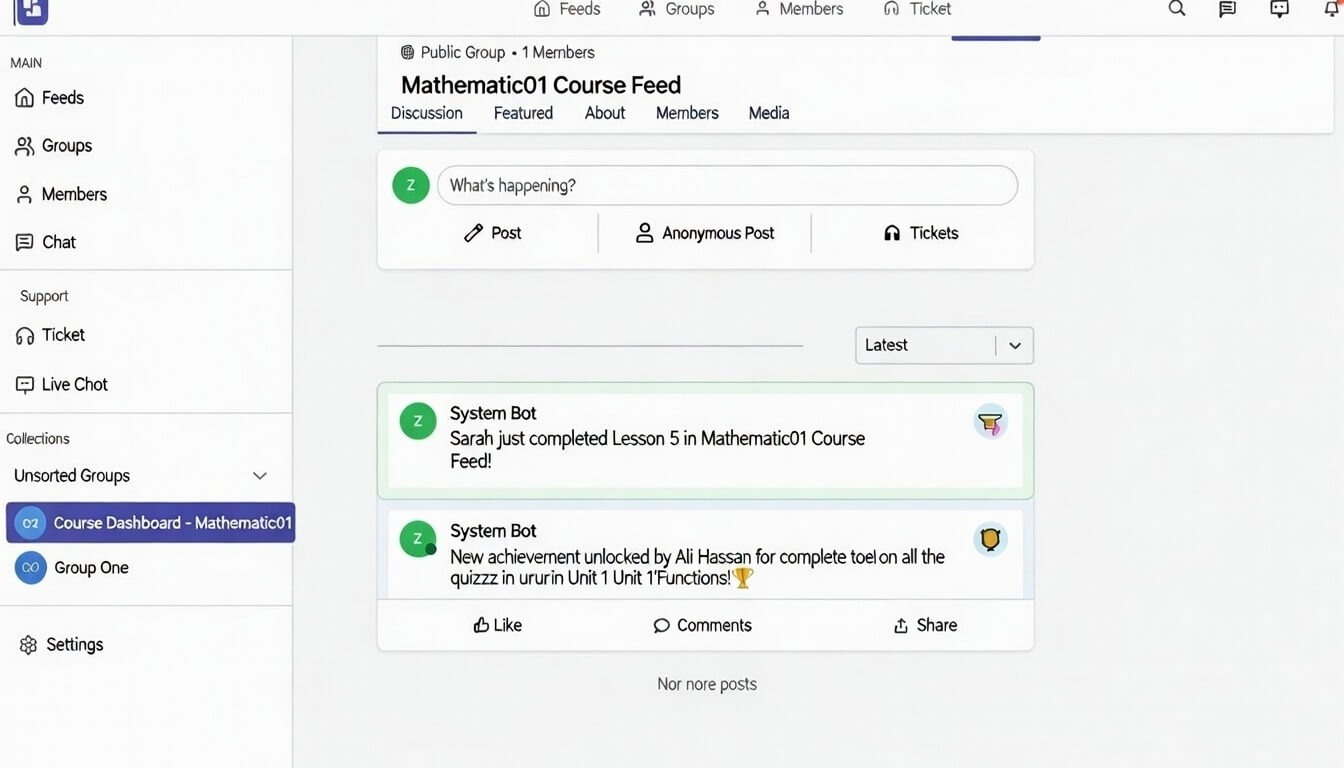
- Integrated Live Chat: Tired of herding your community between your website, a Slack channel, and a Discord server? ZenCommunity eliminates that chaos with high-speed, integrated live chat directly on your WordPress site. It replaces the need for third-party apps, keeping all communication and support in one centralized, data-rich location.
How to Successfully Migrate from Facebook to WordPress
The biggest hurdle isn’t technical; it’s behavioral. You can’t just flip a switch. You need a strategic migration plan.
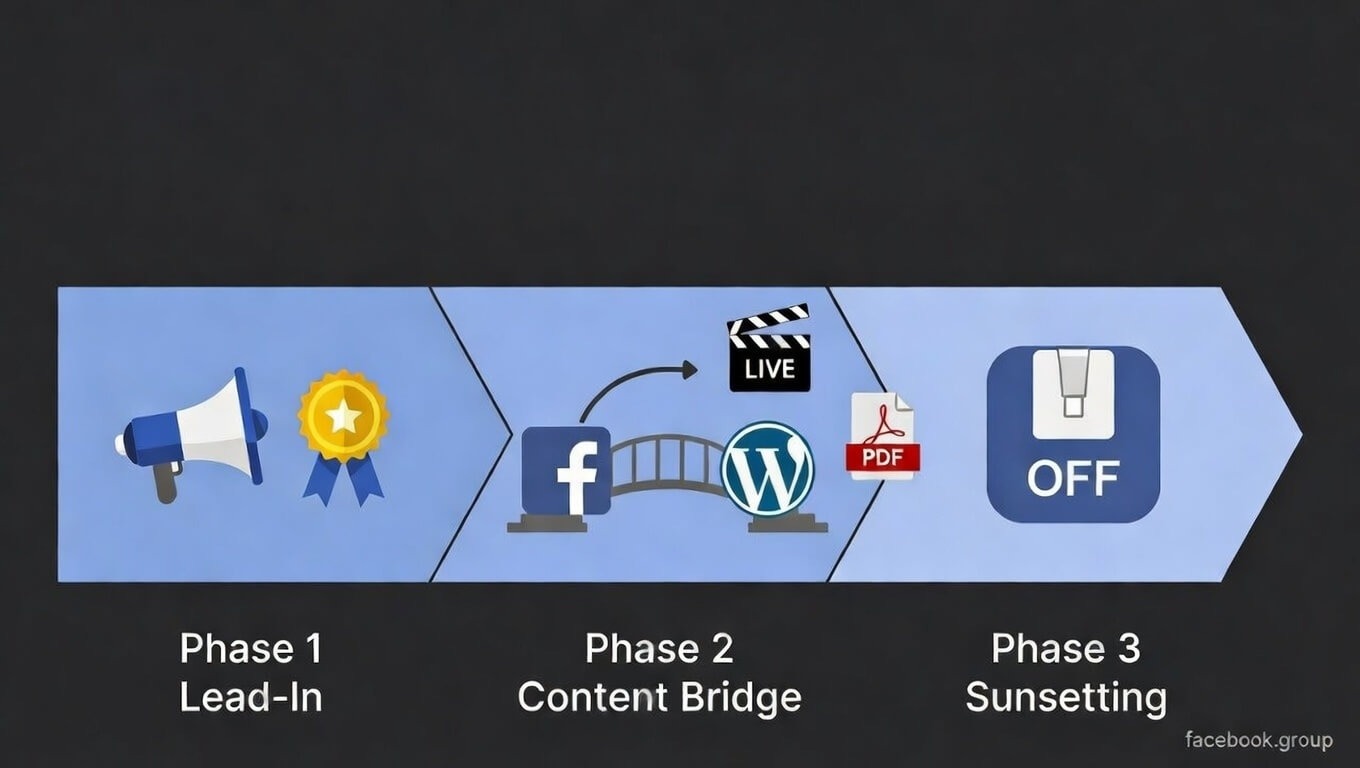
Phase 1: The “Lead-In” Period
Start by building anticipation. Announce the move 2-4 weeks in advance. Create a sense of exclusivity and urgency by offering “Founder Member” badges or a lifetime discount on a paid tier for the first 100 members who join the new WordPress site. Make them feel like pioneers, not refugees.
Phase 2: The Content Bridge
This is the most critical step. You must give them a reason to visit the new site. Start hosting exclusive “Member-Only” live streams, downloadable PDFs, or mini-courses on your WordPress community that are not available on the Facebook Group. Share the teasers and links to these resources in your Facebook Group to drive traffic to your own platform.
Phase 3: The “Sunsetting” Strategy
Once you have critical mass on the new platform, gently turn down the lights on the old one. Announce that all future announcements, support, and exclusive content will only be posted on the new WordPress community. Set the Facebook Group to “Closed” for new posts, or simply stop engaging there entirely. The party has moved, and everyone will eventually come to the new address.
Technical Checklist: What Your Community Needs
Before you install a plugin, make sure your digital foundation is solid.
- Hosting: Shared hosting is the #1 killer of WordPress communities. A dynamic site with real-time feeds and multiple logged-in users requires serious server resources. Invest in managed WordPress hosting that can scale with you.
- Caching: Real-time updates are crucial, but they can clash with traditional caching. Your tech stack needs a smart caching strategy (often handled by your hosting provider or a plugin like LiteSpeed Cache) that can serve pages quickly to guests while keeping the community feed fresh for logged-in members.
- Security: A community means more user data, which means more responsibility. You must implement robust security measures. Use a security plugin (like Wordfence or Sucuri), enforce strong passwords, enable SSL, and consider using CAPTCHA or anti-spam tools like Akismet to prevent your new home from being overrun by bots.
Frequently Asked Questions (FAQs)
Is it hard to set up a community on WordPress?
It’s easier than ever. Modern plugins like ZenCommunity are designed for a 3-step setup process: install the plugin, configure your community pages, and invite your members. The complexity of the past is gone.
Will my members actually leave Facebook?
People are creatures of habit. They won’t leave just because you built it. They will leave if you give them a powerful incentive. If your WordPress site offers a better experience, exclusive content, direct access to you, and a distraction-free environment, they will make the jump.
Does it affect my site speed?
Poorly built tools can drag you down, but ZenCommunity is a well-coded, native powerhouse. It frequently outperforms external SaaS community solutions (such as Facebook widgets or Discourse forums) because it never makes your site wait on slow, third-party server requests.
Does ZenCommunity replace my separate Support and Chat plugins?
Absolutely. It is designed to replace tools like Fluent Support, HelpScout, and Tidio. By bringing these into one native WordPress plugin, you save hundreds in annual fees and keep your site data clean and centralized.
Conclusion: Taking Back Control of Your Audience
Facebook is an unparalleled tool for discovery. Use it to run ads, share your content, and point people to your website. But it is a terrible home for a long-term, sustainable business.
The verdict for 2026 is clear: the era of the massive, generic social network is giving way to the rise of the “Niche Community.“ Your audience is craving a focused, intimate, and distraction-free space to connect with you and each other.
By migrating to WordPress and leveraging a modern tool like ZenCommunity, you’re not just changing platforms. You’re making a fundamental shift in your business philosophy. You are choosing to own your data, own your reach, and own your future.
Stop renting. Start building.