


Online courses are more than just content delivery—they’re about creating meaningful learning experiences. One of the most powerful ways to enhance student engagement and course completion rates is by building a vibrant community around your courses. If you’re using LifterLMS to power your online learning platform, integrating ZenCommunity can transform your isolated courses into thriving student communities.
Why Building a Student Community Matters?
Before diving into the technical integration, it’s worth understanding why community features are essential for online learning:
Increased Engagement: Students who feel connected to their peers are more likely to participate actively in courses, ask questions, and share insights.
Higher Completion Rates: Community support creates accountability and motivation. When students see others progressing through the same material, they’re more likely to stay committed to finishing the course.
Peer Learning: Often, the best explanations come from fellow students who just figured something out themselves. Communities enable this peer-to-peer knowledge exchange.
Long-term Value: A course might be completed in weeks, but a community can provide value for months or years, increasing the lifetime value of your students.
What is ZenCommunity?
ZenCommunity is a WordPress community plugin built for learning platforms. It helps you turn your website into an active social space where learners and instructors can connect easily.
It works closely with learning management systems, so course activity and community discussion stay in one place. Unlike basic forum plugins, ZenCommunity is made for education-focused use cases.
What Can You Create?
With ZenCommunity, you can create:
- Course-based communities
- Student discussion spaces
- Instructor-led groups
- Private or public learning hubs
Key Community Features
It also adds key community features such as:
- Group-based feeds
- Activity streams
- Real-time messaging
- Live chat support
- Support tickets
- Course activity syncing
This means important course actions like enrollment, quiz start or completion, and course completion can appear directly inside community feeds. Learners don’t have to switch pages or tools to stay updated.
Everything runs inside your WordPress site, giving your learners a connected and social learning experience.
Prerequisites
Before setting up the integration, ensure the following:
- LifterLMS is installed and activated on your WordPress website.
- ZenCommunity is installed and activated on your WordPress website.
Both plugins need to be running for the integration to work correctly.
Activate the LifterLMS Add-on in ZenCommunity
To integrate LifterLMS with ZenCommunity, you need to enable the integration add-on:
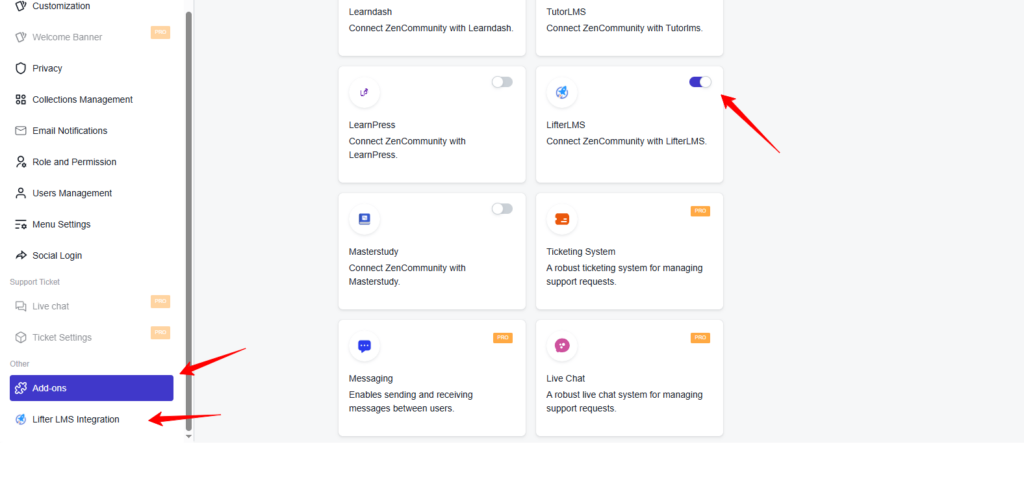
- Go to your WordPress dashboard and access ZenCommunity settings.
- Click on Settings from the ZenCommunity feeds section.
- Locate and select the Addons menu in the ZenCommunity navigation panel.
- Find the LifterLMS Add-on from the list of available addons.
- Toggle the switch to turn it on.
Once enabled, a new tab called LifterLMS Integration will appear in your ZenCommunity settings panel. Click on this tab to proceed with configuring the integration.
Choose LifterLMS Activities to Show in Your Community
After enabling the add-on, you can decide which LifterLMS activities will appear in your ZenCommunity feed.
The integration provides 6 event types that can be linked between LifterLMS and ZenCommunity:
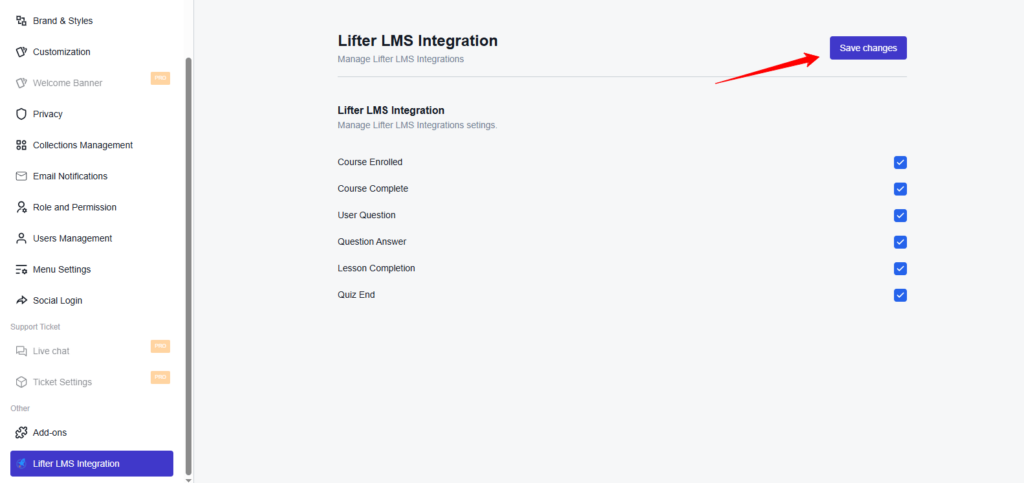
- Course Enrolled
- Course Complete
- User Question
- Question Answer
- Lesson Completion
- Quiz End
To enable your preferred events:
- Check the box next to each event you want to activate.
- After making your choices, click Save Changes to apply your settings.
Configure Course Activity Events for ZenCommunity Groups
Next, you’ll determine which course activities display in specific community groups.
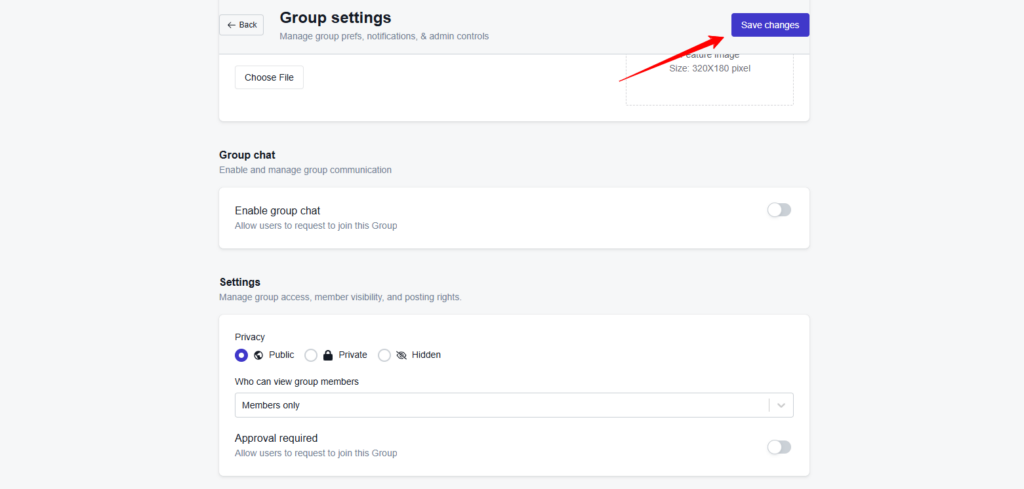
Navigate to your selected group in ZenCommunity.
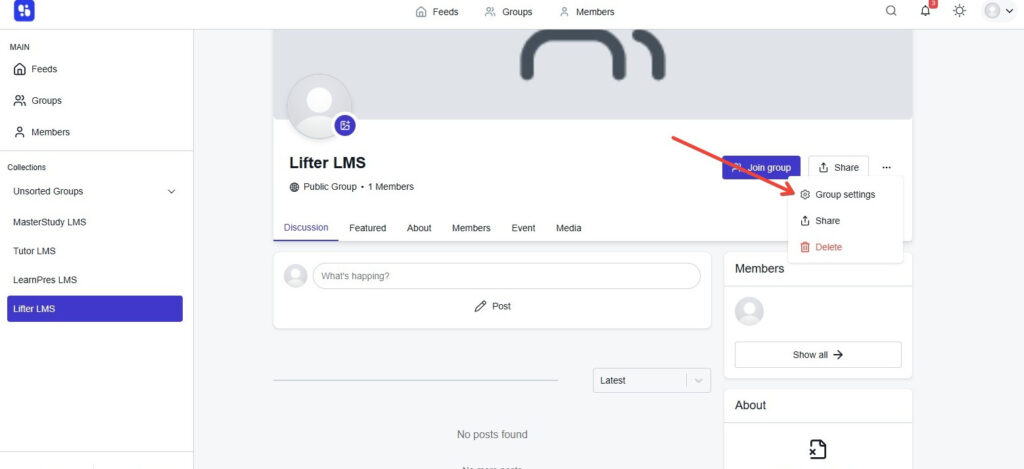
- Click the three-dot menu icon (⋯) next to the group name.
- Select Group Settings from the dropdown menu.
- Scroll down to find the Course Activities Event section.
- Choose which events you want shown in this group.
- Select the course(s) you want linked to these activities.
- Click Save Changes to confirm your group settings.
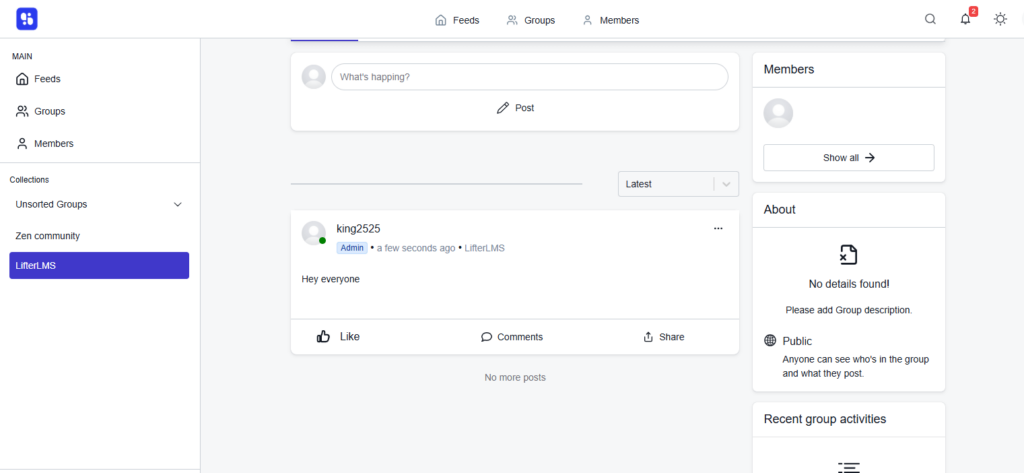
After setup is complete, your chosen course events—like enrollments, quiz completions, or certificates earned—will automatically create posts in the group’s activity feed.
Guidelines for Building Successful Student Communities
Establish Community Guidelines
Create clear expectations for how students should interact. Post community guidelines that encourage respectful dialogue, constructive feedback, and supportive learning. Make these easily accessible within ZenCommunity.
Active Moderation
Especially in the early stages, be present in the community. Respond to questions, facilitate introductions, and model the type of engagement you want to see. As your instructor or teaching assistant, your participation signals that the community is valued.
Create Structured Activities
Don’t just wait for organic conversation. Create discussion prompts, weekly challenges, or group projects that give students reasons to interact. For example, “Share your biggest takeaway from Module 2” or “Post your homework assignment for peer feedback.”
Recognize and Reward Participation
Acknowledge active community members. ZenCommunity often includes features like badges, points, or leaderboards. Use these gamification elements to recognize students who help others, contribute quality content, or maintain consistent engagement.
Facilitate Student-to-Student Connections
Look for opportunities to connect students with similar interests or complementary skills. Introduction threads, study buddy matching, or small group formations can help students build deeper connections beyond casual forum posting.
Advanced Integration Strategies
Automated Community Access
Use LifterLMS webhooks or automation tools to automatically grant community access when students enroll in courses and revoke access when memberships expire. This ensures your community remains exclusive and current.
Community-Driven Content
Pay attention to common questions and discussions in your ZenCommunity forums. These conversations can reveal gaps in your course content, inspire new lessons, or highlight topics worthy of deeper exploration in future modules.
Office Hours and Live Events
Schedule regular live Q&A sessions or office hours promoted through ZenCommunity. The social features make it easy to announce events, gather questions in advance, and follow up with participants afterward.
Alumni Networks
For completed courses, consider transitioning students into alumni community spaces where they can continue networking, share success stories, and stay connected to your brand for future offerings.
Community Performance Metrics
Track key metrics to understand your community’s health:
- Active Users: How many students are regularly logging in and participating?
- Response Time: How quickly are questions being answered, either by you or by peers?
- Content Quality: Are discussions substantive and valuable, or superficial?
- Course Correlation: Do students who participate in community have better completion rates or outcomes?
Use these insights to continuously refine your community strategy and demonstrate ROI for the effort you invest in community building.
Conclusion
Combining LifterLMS with ZenCommunity creates a comprehensive online learning experience that goes beyond content consumption. By fostering genuine connections among your students, you increase engagement, improve learning outcomes, and build a loyal community around your educational brand.
The technical integration is straightforward, but the real work is in nurturing the community culture. Start small, stay consistent, and watch as your students transform from isolated learners into a supportive, engaged learning community that amplifies the value of every course you create.