


The landscape of online education is shifting. While traditional Learning Management Systems (LMS) are exceptional at delivering structured content like courses, quizzes, and certificates, they often leave learners isolated. The future of effective eLearning isn’t just about consuming information; it’s about connection, collaboration, and community. Imagine a platform where a student’s quiz completion automatically sparks a celebratory post in their class group, where complex course questions are resolved in real-time chat, and where peer support is woven into the very fabric of the learning journey.
This is the power of transforming your Academy LMS into a full-fledged community platform with ZenCommunity. This integration bridges the gap between structured learning and vibrant social interaction, creating a dynamic ecosystem that boosts engagement, motivation, and course completion rates. For course creators, educators, and training businesses, this move transcends a simple feature addition. It’s a strategic evolution from a content portal to a destination. This comprehensive guide will walk you through why this integration is essential, how it works, and the steps to build your own thriving, community-powered learning platform.
Why Your LMS Needs a Community
Before diving into the technical “how,” it’s crucial to understand the transformative benefits. A community-based eLearning platform moves beyond the one-way broadcast of information to a multi-directional exchange of knowledge, support, and inspiration.
- Dramatically Increase Learner Engagement and Retention: Solo learning can be a lonely grind. A community injects social accountability and shared purpose. When learners see peers progressing, asking questions, and celebrating milestones, it creates positive pressure and motivation to continue. Discussions around course material deepen understanding and help solidify knowledge far more effectively than passive consumption alone.
- Build a Support Network, Not Just a Student Roster: In a traditional LMS, instructor support can be a bottleneck. A community empowers learners to help each other. Common questions get answered quickly by peers, advanced students can mentor beginners, and instructors can focus on higher-level guidance. This creates a scalable, 24/7 support system that enhances the learner experience.
- Foster Organic Marketing and Brand Advocacy: A happy, connected community becomes your most powerful marketing asset. Engaged learners are more likely to provide testimonials, refer friends, and become repeat customers. The community itself generates valuable user-generated content like discussions, project shares, and success stories that showcase the real-world value of your courses.
- Gain Unparalleled Insights: Beyond standard quiz scores, a community gives you a window into your learners’ challenges, interests, and conversations. This qualitative data is invaluable for improving existing courses, developing new material that addresses real needs, and understanding your audience on a deeper level.
ZenCommunity + Academy LMS: More Than an Integration, A Fusion
ZenCommunity isn’t just another forum plugin slapped onto your LMS. It’s an all-in-one community engine built natively for WordPress that brings together social feeds, real-time chat, and a support ticket system into a single, seamless environment. When integrated with Academy LMS, it automates the social layer of learning.
What Makes This Integration Unique?
While other solutions may offer basic activity streams, the ZenCommunity and Academy LMS integration is designed for depth and automation:
- Automated Social Learning Feed: Key learning events from Academy LMS are automatically published to designated ZenCommunity groups.
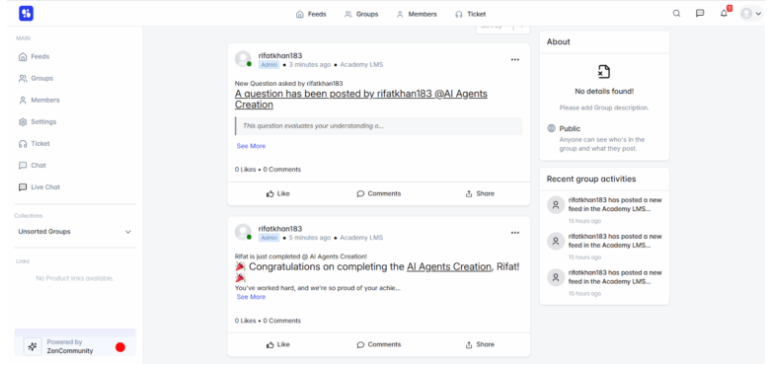
Example: When “Student A” completes the “Digital Marketing Fundamentals” quiz, a post automatically appears in the “Digital Marketing 2024 Cohort” group: “Student A has completed the ‘Final Quiz’ for Digital Marketing Fundamentals!” This fuels recognition and discussion.
- Unified Communication Hub: It eliminates the need for multiple disjointed tools. Learners don’t need to switch between the LMS, a separate forum, a chat app like Slack, and an email helpdesk. Everything happens in one place: course access, group discussions, private messaging with classmates, and live support.
- From Questions to Tickets: A learner’s question in a community feed can be instantly converted into a tracked support ticket by an instructor or admin. This streamlines support, ensures no request is lost, and keeps the resolution process transparent for everyone involved.
Automated Events: The Pulse of Your Learning Community
The integration works by sharing specific triggers from Academy LMS to ZenCommunity . Administrators have full control over which events create activity:
- Course Enrolled: Announces new members to a group, fostering a welcoming atmosphere.
- Course Complete: Celebrates major achievements, inspiring others in the cohort.
- Course Announcements: Shares instructor updates directly into the social feed for high visibility.
- Lesson Update: Shows consistent progress, encouraging a culture of small wins.
- Quiz Start / Quiz End: Sparks discussions about challenging material and shared experiences.
- User Question / Answer: Turns Q&A into a public knowledge base for the entire community.
Step-by-Step: Building Your Community Platform
Transforming your site is a straightforward process. Here is a detailed guide based on the official integration documentation.
Phase 1: Prerequisites and Installation
- Ensure WordPress Environment: You need a self-hosted WordPress website.
- Install Core Plugins: Purchase, install, and activate both Academy LMS and ZenCommunity from their official sources. The integration requires the premium versions for full functionality.
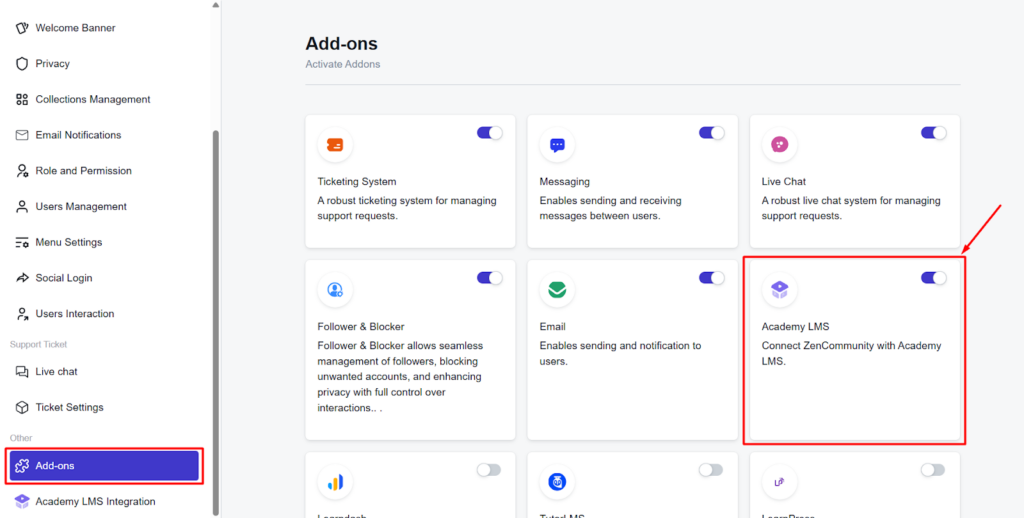
- Activate the Integration Add-on: Navigate to your WordPress Dashboard > ZenCommunity > Settings > Addons. Find the “Academy LMS Add-on” in the list. Toggle the switch to “Enable” it. A new “Academy LMS Integration” tab will appear.
Phase 2: Configuration and Setup
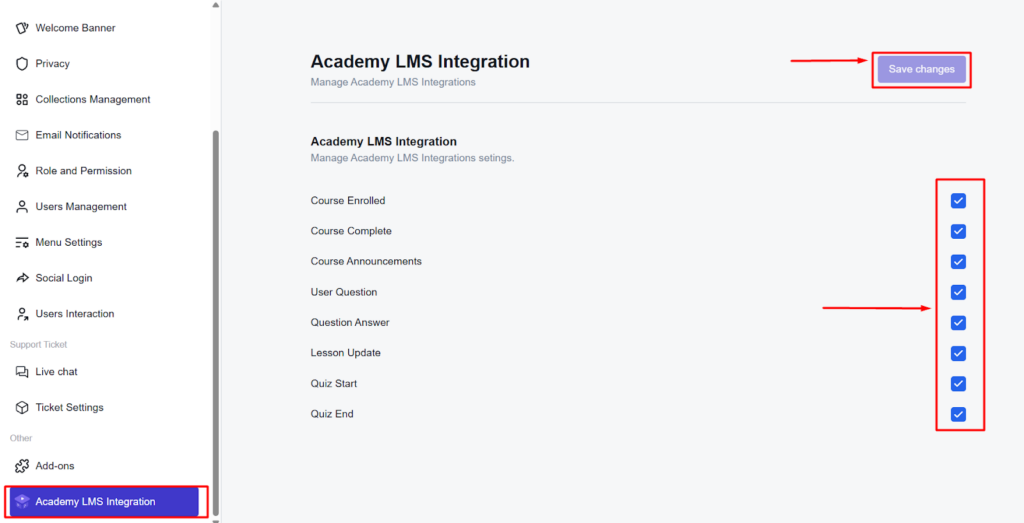
- Select Global Events: Go to the new Academy LMS Integration tab. You will see a list of the 8 available events (Course Enrolled, Course Complete, etc.). Check the boxes for the events you want to be shared platform-wide. Click “Save Changes“.
- Create and Configure Community Groups: Groups are the heart of your community. Create them based on courses, membership levels, or interests. Go to ZenCommunity > Groups, create a new group, and add a description.
- Link Courses to Groups (The Magic Step): Edit the ZenCommunity group you want to link. In Group Settings, find the “Course Activities Event” section.
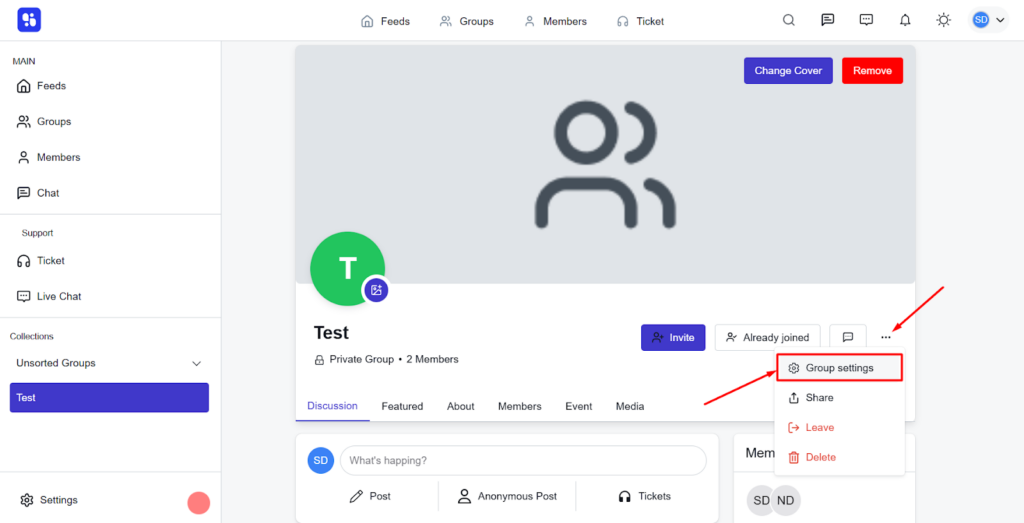
Here, you can fine-tune which events appear in this specific group (overriding global settings if needed). Most importantly, use the dropdown to select the Academy LMS course(s) you want to link to this group. Save the group settings.
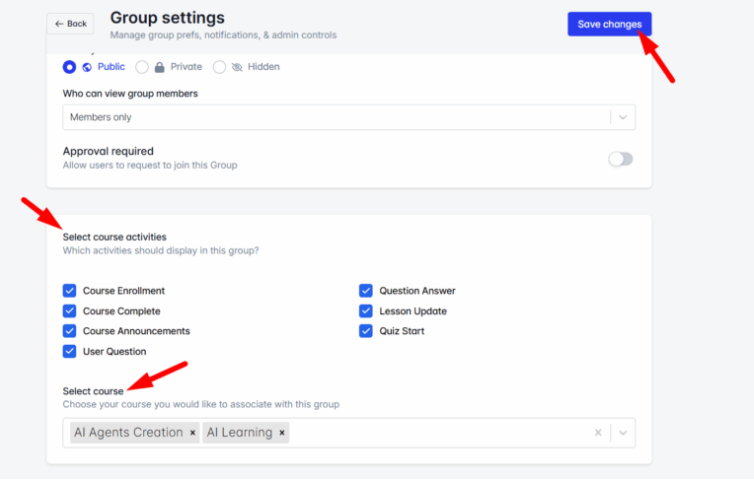
Result: Once linked, any selected event from the linked course (e.g., a student enrolling) will automatically post an update in this group’s activity feed.
Phase 3: Launch and Engagement Strategy
Onboard Your First Members: Invite your existing students to join the community. Seed initial discussions with introductory topics.
- Leverage ZenCommunity’s Full Toolkit:
- Live Chat: Use the website-wide live chat widget for instant visitor support and sales conversions.
- Private Messaging: Let learners connect one-on-one for collaboration.
- Support Tickets: Manage all learner help requests systematically without leaving WordPress.
- Assign Moderators: Empower active community members or teaching assistants to help manage discussions.
Best Practices for a Thriving Learning Community
- Start with a Clear Purpose: Each group should have a clear focus (e.g., a specific course cohort). This focuses discussions and increases relevance.
- Lead by Example: Instructors and community managers should be active participants, not just observers. Ask questions, celebrate wins, and guide conversations.
- Establish Clear Guidelines: Set simple, respectful community rules from day one to foster a positive and productive environment.
- Recognize and Reward: Use features like shout-outs in feeds or simple badges (where available) to acknowledge helpful members and active contributors.
- Integrate Community into the Curriculum: Make participation part of the learning journey. Assign discussions, encourage peer review of projects, and host live Q&A sessions within ZenCommunity groups.
The Future of Your eLearning Business is Connected
Transforming your Academy LMS with ZenCommunity is more than a technical integration; it’s a commitment to creating a more human, engaging, and successful learning experience. You move from simply selling information to providing a transformative environment where students learn from you and from each other.
This powerful combination tackles the core challenges of modern eLearning, like isolation, dropout rates, and lack of engagement, by building a vibrant ecosystem around your content. The automated synergy between learning actions and social feedback creates a virtuous cycle that drives motivation, completion, and loyalty.
Ready to stop running a course website and start building a learning community? Begin by exploring the Academy LMS and ZenCommunity integration today. Install the plugins, enable the add-on, and take the first step toward creating the dynamic, interactive, and highly engaged learning platform your students deserve.